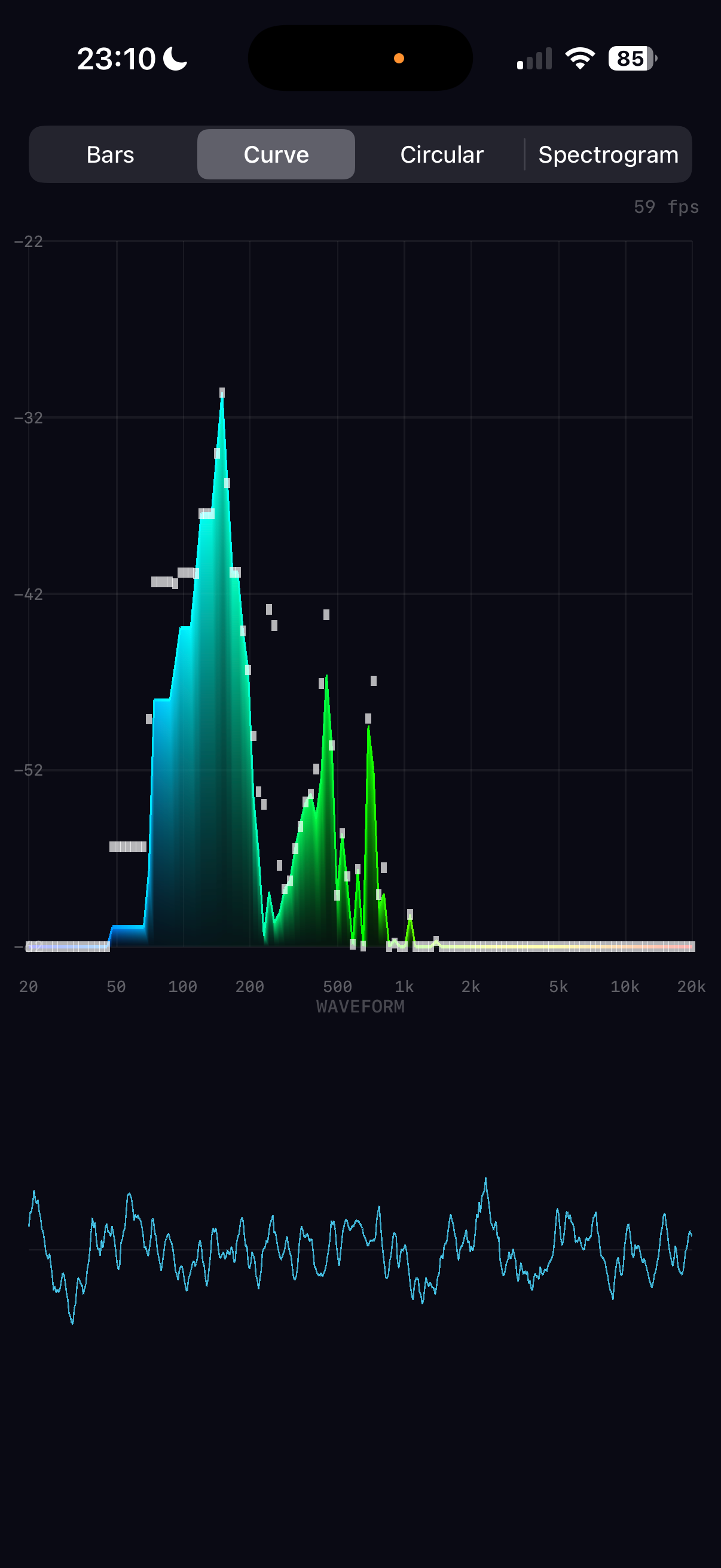
Real-time audio spectrum analysis with GPU-accelerated Metal rendering
How to build a real-time audio spectrum analyser for iPhone
Real-time audio spectrum analysis with GPU-accelerated Metal rendering
Every sound you hear is a cocktail of frequencies — bass, midrange, treble — mixed together into a single pressure wave. A spectrum analyser takes that wave apart, revealing its ingredients in real time. This article explains how Spectrum does it: capturing audio from the iPhone's microphone, decomposing it with a Fast Fourier Transform, and rendering the result at 60 frames per second using the GPU.
The architecture splits neatly into two halves. The audio pipeline runs on the CPU, using Apple's Accelerate framework to perform signal processing with SIMD instructions — processing four or eight numbers simultaneously on every clock cycle. The rendering pipeline runs on the GPU via Metal, turning frequency data into coloured triangles that the hardware rasterises in parallel across thousands of shader cores.
Between these two halves sits a crucial design decision: decoupled rates. Audio arrives at ~21 frames per second (every 2048 samples at 44.1kHz). The display runs at 60 frames per second. Rather than coupling them — which would mean either wasting GPU frames or stuttering the animation — the renderer maintains its own smoothed state and interpolates toward the latest audio data on every frame. This is what gives the display its fluid, professional feel.
What follows is a complete walkthrough of both pipelines, from microphone to pixel, with the mathematics behind each stage and how those operations map to the hardware.
The audio pipeline accepts input from either the microphone or a music file. Both sources share the same FFT processing chain — the only difference is which node's tap feeds the buffer. A single persistent AVAudioEngine manages the entire graph: all nodes (playerNode, musicMixer) are connected before the engine starts, and source switching only swaps taps. The eight FFT stages execute in ~10 microseconds.
Music files are sourced from the device library via MPMediaQuery, filtered through three checks: assetURL != nil (rejects cloud-only), hasProtectedAsset == false (rejects DRM), and URL extension is not .movpkg (rejects Apple Music cached streaming packages that appear local but use an undecipherable container format).
In music mode, an exponential spectral tilt is applied after band mapping to compensate for the steep high-frequency rolloff of commercial music. Bass below 200Hz is left untouched; above 200Hz, each band is boosted by rate × octavespower dB, where rate=5.0 and power=1.4. This makes the full 20Hz–20kHz range visually active rather than being dominated by bass energy.
The journey from microphone to frequency data passes through eight stages, each performing a well-defined mathematical operation. What makes this fast isn't clever algorithms alone — it's that Apple's Accelerate framework maps each operation onto SIMD (Single Instruction, Multiple Data) instructions. ARM NEON, the SIMD engine on Apple Silicon, processes 4 floats simultaneously in a single clock cycle. The entire pipeline completes in about 10 microseconds — 0.02% of the available time budget.
The microphone delivers a continuous audio stream, but the FFT operates on a finite chunk (2048 samples). Abruptly cutting the signal at chunk boundaries creates artificial high-frequency artefacts called spectral leakage. A Hanning window tapers the signal to zero at both edges, eliminating this.
vDSP_hann_window — pre-computes all 2048 window coefficients once at initThe element-wise multiply input[n] × w[n] is a textbook SIMD operation. On Apple Silicon, ARM NEON processes 4 floats per instruction via 128-bit registers. For 2048 samples, that's ~512 NEON multiply instructions instead of 2048 scalar multiplies.
The vDSP FFT requires input in split complex format: separate arrays for real and imaginary parts. Since our audio is purely real (no imaginary component), we pack it by treating consecutive pairs of real samples as (real, imaginary) pairs.
vDSP_ctoz(input, stride=2, &splitComplex, 1, 1024)
This is a deinterleave operation — extract even-indexed and odd-indexed elements into separate arrays. NEON handles this with vector load/store with stride, processing 4 pairs per iteration.
The Discrete Fourier Transform decomposes a time-domain signal into its constituent frequencies. For N samples, the DFT is:
| x[n] | input sample at time index n |
| X[k] | complex amplitude at frequency bin k |
| e(−jθ) | cos(θ) − j·sin(θ) (Euler's formula) |
| fk | k × sampleRate / N (frequency of bin k) |
Naively, this is O(N²) — each of the N output bins sums over all N input samples. The Fast Fourier Transform (Cooley-Tukey algorithm) exploits symmetries in the twiddle factors e^(−j2πkn/N) to reduce this to O(N log N). For N=2048, that's ~22,000 operations instead of ~4.2 million.
vDSP_fft_zrip(setup, &splitComplex, 1, log₂(2048)=11, forward)
In-place, real-input FFT. The "rip" stands for real, in-place. vDSP exploits the conjugate symmetry of real-valued signals — X[N−k] = X[k]* — so only N/2 complex outputs are needed. Internally, each butterfly stage performs paired complex multiply-adds. NEON executes these as fused multiply-accumulate (FMLA) instructions on 4-wide float vectors, processing 2 complex butterflies simultaneously. The 11 stages of the 2048-point FFT complete in ~1,000 NEON instructions.
The FFT output is 1024 complex values. We need the power (squared magnitude) at each frequency — this tells us how much energy is present at that frequency.
vDSP_zvmags(&splitComplex, 1, &magnitudes, 1, 1024)
Each element: load one float from realp, one from imagp, square both (FMUL), add (FADD), store result. NEON processes 4 bins per iteration: load 4 reals and 4 imags into two 128-bit registers, two vector multiplies, one vector add, one vector store. 1024 bins ÷ 4 per iteration = 256 NEON iterations.
Human hearing perceives loudness logarithmically — a 10× increase in power sounds roughly "twice as loud". Converting to decibels maps this perception to a linear scale.
| Power | dB | |
|---|---|---|
| 1.0 | 0 dB | |
| 0.1 | −10 dB | |
| 0.01 | −20 dB | |
| 0.001 | −30 dB | |
| 1e-8 | −80 dB | display floor |
Values are floored to 10⁻²⁰ before the log to avoid −∞ from silent bins.
vDSP_vdbcon(magnitudes, 1, &ref, &dbMags, 1, 1024, flag=1)
Flag 1 = power dB (10×log₁₀). Internally, vDSP uses a NEON-optimised log₁₀ approximation — typically a polynomial evaluation on the mantissa combined with exponent extraction from the IEEE 754 float representation. Processes 4 values per iteration, so 1024 bins complete in ~256 NEON iterations with the polynomial evaluation.
The 1024 FFT bins are linearly spaced in frequency (each bin = sampleRate/N ≈ 21.5 Hz). But human pitch perception is logarithmic — the jump from 100 Hz to 200 Hz (one octave) sounds the same as 1000 Hz to 2000 Hz (also one octave). We map bins to 128 logarithmically-spaced bands.
| Bands | Frequency | Region | FFT bins each |
|---|---|---|---|
| 0–20 | 20 Hz – 100 Hz | bass | ~4 |
| 20–60 | 100 Hz – 1 kHz | midrange | ~2–10 |
| 60–100 | 1 kHz – 6 kHz | presence | ~10–40 |
| 100–127 | 6 kHz – 20 kHz | brilliance | ~40–100 |
This is implemented as a scalar loop since each band maps to a different number of bins — not a uniform SIMD operation. At only 128 iterations with simple averaging, it completes in microseconds.
Rather than mapping a fixed -80 to 0 dB range (which leaves quiet signals invisible), the display window adapts to the current signal level. The ceiling tracks the peak dB value with instant rise and slow decay.
The audio engine publishes raw normalised data at ~21fps. The Metal renderer applies its own smoothing at 60fps for silky-smooth animation, completely decoupled from the audio update rate.
Asymmetric exponential smoothing — fast attack, slow decay:
Peak tracking at 60fps — instant rise, gentle fall:
| Operation | vDSP function | NEON iterations | Time (est.) |
|---|---|---|---|
| Hanning window | vDSP_vmul | ~512 | ~1 µs |
| Pack split complex | vDSP_ctoz | ~256 | ~0.5 µs |
| FFT (2048-pt real) | vDSP_fft_zrip | ~1,000 | ~5 µs |
| Squared magnitudes | vDSP_zvmags | ~256 | ~0.5 µs |
| Power to dB | vDSP_vdbcon | ~256 | ~1 µs |
| Log band mapping | (scalar loop) | 128 | ~2 µs |
| Total | ~10 µs |
The entire audio pipeline uses roughly 0.02% of the available CPU budget per audio callback — demonstrating why vDSP's SIMD approach is more than adequate and GPU compute would add complexity for no benefit at this scale.
The view hierarchy, data flow, rendering pipeline, and testing infrastructure that connect the audio and rendering halves into a working app.
At this point we have 128 normalised frequency values arriving ~21 times per second. The rendering pipeline's job is to turn these numbers into a beautiful, fluid visualisation at 60 frames per second — smoothing over the gaps between audio updates and giving the user four distinct ways to see their sound.
SwiftUI is excellent for UI controls (our mode picker and label overlays use it), but for rendering thousands of animated shapes at 60fps it becomes a bottleneck. Each SwiftUI view carries overhead — identity tracking, diffing, layout computation. Drawing 128 animated bars means 128 view updates per frame through SwiftUI's reconciliation engine.
Metal bypasses all of this. We write vertex data directly into GPU memory and issue a single draw call. The GPU's massively parallel architecture rasterises all triangles simultaneously. For our spectrogram mode with ~98,000 triangles, this is the difference between fluid animation and a slideshow.
All four visualisation modes share one Metal render pipeline — a single vertex shader and a single fragment shader. Rather than writing mode-specific GPU code, we do the mode-specific work on the CPU: building an array of coloured triangles that the GPU simply renders. This is the key architectural choice.
This works because our bottleneck is fill rate (pixels), not vertex throughput. Modern mobile GPUs can handle millions of vertices per frame — our maximum of ~100K is trivial. The simplicity of having one shader pair means less GPU state switching, fewer pipeline objects, and dramatically simpler code.
Each vertex is a Swift struct with a 2D position and an RGBA colour:
The Metal shader must use matching types. Using packed_float4 (no alignment padding, 24-byte stride) caused a critical bug — every vertex after the first was read from the wrong offset, producing garbled geometry. The fix was to use non-packed float2/float4 in Metal, giving the same 32-byte stride with identical padding.
Always verify MemoryLayout<YourVertex>.stride in Swift matches your Metal struct size. Swift's SIMD types have alignment requirements (SIMD4 = 16-byte) that insert invisible padding. Metal's packed types don't. They must agree, or every vertex after the first shifts further out of alignment.
The classic equaliser. Each of the 128 frequency bands becomes a vertical rectangle (quad), rendered as two triangles. Colour is determined by frequency position through a five-stop gradient ramp.
| Shape | 2 triangles = 6 vertices |
| Bottom vertices | dimmed colour (35% brightness) → dark base |
| Top vertices | full colour → bright tip |
| GPU interpolation | automatic vertical gradient per bar |
Maps frequency position t ∈ [0, 1] through five stops with linear interpolation between each pair:
Bass frequencies glow blue-cyan, mids are green, treble burns yellow-red. The four-segment piecewise interpolation is branchless within each segment.
A smooth filled area under the frequency curve, with a bright outline traced along the top edge.
Frequency bands radiate outward from a central point, creating a pulsing ring. Each band is a tapered bar at a specific angle around the circle.
| Problem | iPhone portrait: NDC x range maps to fewer pixels than y |
| Fix | Multiply all x-offsets by height / width |
| Without | Ring appears as a tall ellipse |
A scrolling heatmap where the x-axis is frequency, the y-axis is time, and colour represents intensity. This is the most vertex-heavy mode.
| Value | Colour | RGBA | |
|---|---|---|---|
| 0.00 | black | (0, 0, 0) | silence |
| 0.25 | dark blue | (0, 0, 0.8) | |
| 0.50 | cyan | (0, 1, 1) | |
| 0.75 | yellow | (1, 1, 0) | |
| 1.00 | red | (1, 0.3, 0) | loud |
A Metal texture with a fragment shader doing colour lookup would be more memory-efficient. But the vertex approach keeps the architecture simple: one pipeline, one shader pair, one draw call for every mode. The 98K vertices (3.1 MB at 32 bytes each) are well within the pre-allocated 200K-vertex buffer (6.4 MB). The CPU builds them in ~2ms and the GPU rasterises them in under 1ms. Simplicity wins over theoretical elegance.
The time-domain audio signal rendered as a cyan trace below the spectrum area. Drawn as a series of thin quads along the waveform curve, similar to the curve outline technique.
A critical insight: the audio engine delivers new spectrum data at ~21fps (every 2048 samples at 44.1kHz), but the display runs at 60fps. If we used the audio data directly, bars would jump 21 times per second with dead frames in between — visible as micro-stuttering.
The renderer maintains its own displaySpectrum array and interpolates toward the target on every frame:
| Formula | Result | |
|---|---|---|
| Attack to 90% | log(0.1) / log(1 − 0.35) | ≈ 5.3 frames ≈ 88ms |
| Decay to 10% | log(0.1) / log(1 − 0.12) | ≈ 18 frames ≈ 300ms |
Why asymmetric? Equal attack and decay feels "mushy" — sounds seem to linger too long. Fast attack captures transients like drum hits instantly, while slow decay creates a smooth, natural fade that reads as "energy dissipating" rather than "signal dropping". The ~3:1 ratio between attack and decay is common in professional audio metering.
Peak tracking also runs at 60fps — peaks snap up instantly but fall at 0.006/frame, taking ~3.5 seconds to fully decay. This creates the characteristic "falling dot" effect seen in professional analysers.
After building all vertices (spectrum + waveform), the renderer uploads them to the GPU and issues one draw call:
| 1 | reserveCapacity based on mode (avoids reallocation) |
| 2 | Build mode-specific vertices + waveform into single array |
| 3 | Copy into pre-allocated MTLBuffer via copyMemory |
| 4 | Create command buffer + render command encoder |
| 5 | Set pipeline state (vertex_main + fragment_main) |
| 6 | Bind vertex buffer at index 0 |
| 7 | drawPrimitives(.triangle, vertexStart: 0, vertexCount: N) |
| 8 | End encoding, present drawable, commit |
| Mode | Vertices | GPU Buffer | CPU Build | GPU Raster |
|---|---|---|---|---|
| Bars | ~1,700 | ~54 KB | <0.5 ms | <0.5 ms |
| Curve | ~2,400 | ~77 KB | <0.5 ms | <0.5 ms |
| Circular | ~1,700 | ~54 KB | <0.5 ms | <0.5 ms |
| Spectrogram | ~101,000 | ~3.2 MB | ~2 ms | <1 ms |
The GPU handles the heavy lifting — rasterising triangles, interpolating colours, and blending with alpha transparency. The CPU's job is just to decide what to draw and where. This CPU-for-logic, GPU-for-pixels split is the same principle behind every real-time graphics application, from games to medical imaging.