Spectrum
Build Tutorial — A conversation-driven development narrative
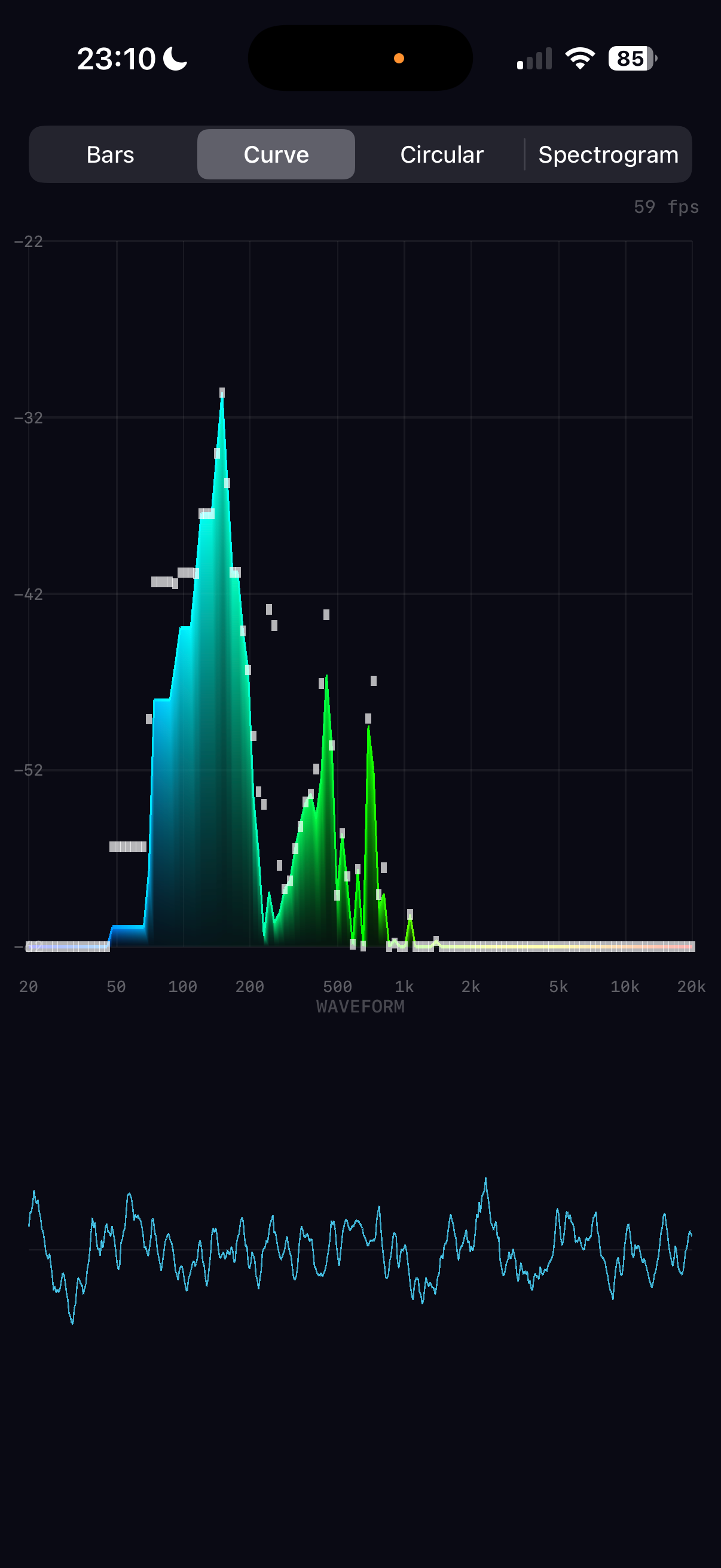
The finished app running on iPhone 16 Pro — built entirely through conversation
1
The Initial Vision
I'd love to build a real-time audio spectrum analyser that shows a beautiful real-time display on my phone of the live frequency breakdown of incoming audio. Could we utilise the GPU for graphics, and would it be worth using it for the audio analysis too — presumably a fast Fourier transform?
The key architectural decision was made upfront: use the GPU (Metal) for rendering but the CPU (Accelerate/vDSP) for FFT analysis. Apple's vDSP is heavily SIMD-optimised and processes a 2048-sample FFT in microseconds. Running FFT on the GPU via Metal compute shaders would add complexity with data-transfer overhead that negates any speed benefit at these buffer sizes. The GPU's strength is rendering thousands of coloured triangles per frame — exactly what we need for the visualisation.
The decision to use vDSP over Metal compute is buffer-size dependent. For audio (1K–4K samples), CPU wins. For large-scale signal processing (millions of samples), GPU compute would be worth the transfer overhead.
2
Clarifying the Design
Multiple visualisation modes please. Gradient colours (cool to hot). Logarithmic frequency scale. Peak indicators, dB scale, frequency labels, waveform view beneath. Let's call it Spectrum.
With clear requirements established, the full architecture was planned: four modes (Bars, Curve, Circular, Spectrogram), all rendered through a single Metal pipeline using coloured triangles. The audio engine would capture via AVAudioEngine, process with vDSP, and publish normalised data that the renderer reads each frame.
Complete project scaffolded in one pass: 7 Swift source files, 1 Metal shader file, Xcode project, and all documentation. The build succeeded on the first attempt — a testament to careful upfront planning of the pbxproj structure and Metal pipeline configuration.
3
The Audio Pipeline
The FFT pipeline was built using Accelerate's C-level vDSP functions rather than the newer Swift overlay, giving precise control over the processing chain:
Hanning window → reduces spectral leakage at buffer boundaries
vDSP_ctoz → packs real audio data into split-complex format
vDSP_fft_zrip → performs the real-to-complex FFT in-place
vDSP_zvmags → computes squared magnitudes (power spectrum)
vDSP_vdbcon → converts power to decibels
The logarithmic band mapping is critical for musical perception. Linear mapping would dedicate half the display to frequencies above 10kHz (one octave), while log mapping gives equal visual weight to each octave: 20–40Hz, 40–80Hz, ..., 10k–20kHz. This matches how we actually hear pitch.
4
Metal Rendering Architecture
Rather than using separate Metal pipelines for each visualisation mode, all four modes share a single vertex/fragment shader pair. The CPU builds coloured vertex data (position + RGBA) each frame, uploads it to a pre-allocated 200K-vertex Metal buffer, and issues a single draw call. This keeps the shader code trivial while giving full flexibility on the CPU side.
The spectrogram mode was initially considered with a Metal texture approach, but the vertex-based approach (128×128 coloured quads = ~98K vertices) proved simpler and well within performance budgets.
The gradient colour scheme maps frequency position (0–1) through a five-stop ramp: blue → cyan → green → yellow → red. This provides good perceptual contrast across the spectrum. The spectrogram uses a separate heatmap that starts from black for silence, making quiet regions visually distinct.
5
The Metal Alignment Bug
The graphics seem broken. Are you able to test in the simulator? Also once you choose Spectrogram the app freezes.
The root cause was a struct alignment mismatch between Metal and Swift. The Metal shader used packed_float2 + packed_float4 (24 bytes per vertex, no padding), but Swift's SIMD4<Float> requires 16-byte alignment, making SpectrumVertex 32 bytes (with 8 bytes of padding between position and colour). Every vertex after the first was read from the wrong offset, causing garbled positions and colours.
In Spectrogram mode, the ~98K triangles with garbled positions created degenerate geometry covering the entire screen many times over, overwhelming the GPU with fragment shader work — causing the freeze.
Changed the Metal shader to use non-packed float2/float4 types, matching Swift's 32-byte stride. Also added reserveCapacity for the vertex array and throttled spectrogram history updates to ~20fps. All four modes now render correctly with no freezing.
This is a common Metal/Swift pitfall. Metal's packed_float4 has 4-byte alignment (24-byte struct), while Swift's SIMD4<Float> has 16-byte alignment (32-byte struct). Always verify that Metal struct layouts match Swift struct layouts — MemoryLayout<T>.stride is the key value to check.
6
Simulator Testing with Launch Arguments
You don't need to guess where the UI buttons are — you can add command line args to set the mode of operation when testing! This is how we eventually got the ShiftingSands simulation working, if you remember?
Rather than trying to tap simulator UI from the command line (which is unreliable), the app was given launch argument support. ProcessInfo.processInfo.arguments is parsed in ContentView to accept -mode bars|curve|circular|spectrogram. This enables fully automated visual testing: install, launch with a specific mode, screenshot, verify — all from the command line.
All four modes were tested automatically in the simulator, confirming correct rendering after the alignment fix. The pattern was documented in the top-level CLAUDE.md as a standard approach for all future projects with multiple visual states.
The testing workflow: xcrun simctl terminate → xcrun simctl launch ... -- -mode X → sleep 2 → xcrun simctl io screenshot. Grant permissions upfront with xcrun simctl privacy ... grant microphone to avoid dialogs.
7
Comprehensive Test Suite
Don't forget to write comprehensive tests!
Pure decision logic was extracted from AudioEngine and MetalRenderer into internal static methods that can be tested without audio hardware or a Metal GPU. This included logarithmic band mapping, exponential smoothing, peak tracking, gradient colour calculation, and heatmap colour mapping. The test target uses Xcode 16's PBXFileSystemSynchronizedRootGroup for automatic test file discovery.
46 tests across three suites (AudioEngineTests, MetalRendererTests, SpectrumDataTests) covering boundary values, clamping, interpolation, colour stops, layout constraints, coordinate conversion, and custom dB range parameters. All passing.
8
Mic Sensitivity and Auto-Leveling
I think we need more sensitive auto-scaling — it's still hard to get much of a display. Maybe the processing mode is only getting a quiet signal from the mic?
Three issues were identified working together to suppress the display:
1. Audio session mode: .measurement mode disables the iPhone's automatic gain control, resulting in very quiet raw mic input. Switching to .default mode enables AGC for maximum sensitivity.
2. FFT normalisation: The power spectrum was normalised by 1/N², but for a one-sided spectrum (discarding the symmetric negative frequencies) the correct factor is 4/N² — a +6dB boost.
3. Auto-level too conservative: The minimum ceiling of -30dB was too high, and the 60dB display range too wide. Changed to ceiling [-60, 0] with a 40dB window for much more visual sensitivity.
The display now fills with activity even in a quiet room. dB labels update dynamically to show the current auto-leveled range, confirming the adaptation is working.
9
60fps Smoothing and FPS Counter
Could we have an FPS display in the corner of the screen? I'm hoping the decay of the display can be ultra-smooth pro graphics quality.
The fundamental issue was that smoothing happened at the audio callback rate (~21fps), not the display rate (60fps). Bars would jump 21 times per second with dead frames in between — visible as micro-stuttering.
The fix was to decouple the animation from the audio pipeline entirely. AudioEngine now publishes raw normalised spectrum data. MetalRenderer maintains its own displaySpectrum array and interpolates toward the target values every frame at 60fps using asymmetric lerp — fast attack (0.35) for responsive rises, slow decay (0.12) for smooth, professional-quality falls. Peak tracking also moved to 60fps with a gentle 0.006/frame decay (~3.5 seconds for a full fall).
An FPS counter was added by tracking frame times in the renderer and displaying via a SwiftUI overlay that polls the shared coordinator every 0.5 seconds.
The display runs at a locked 60fps with silky-smooth bar rises and falls. The decoupled architecture means even if the audio callback rate varies, the animation quality is consistent.
Asymmetric smoothing is key to professional audio visualisers. Equal attack and decay feels "mushy" — sounds seem to linger too long. Fast attack (0.35) captures transients like drum hits instantly, while slow decay (0.12) creates a smooth, natural fade that reads as "energy dissipating" rather than "signal dropping". The 3:1 ratio between attack and decay is a common starting point in pro audio metering.
10
Architecture as a Technical Article
Could you make architecture.html something more like an article I would read in a technical magazine? Nice intro, explanation of the narrative... and could you add inline diagrams and images? The DSP sections aren't very clear to read — could you format them better?
The architecture document was transformed from a flat reference into a three-part technical article. A magazine-style introduction sets the scene — what a spectrum analyser does, why the architecture splits into CPU audio and GPU rendering, and the key insight about decoupled rates.
The math blocks were completely restyled with colour-coded syntax: cyan for variables, purple for functions, green for numbers, orange for operators, blue headings for visual hierarchy, and proper HTML tables replacing monospaced columns. Inline SVG diagrams were added throughout — a Hanning window visualisation, a time-to-frequency domain transform, a linear-vs-logarithmic band comparison, an auto-leveling before/after, a CPU/GPU pipeline split, gradient colour ramps, a memory alignment bug diagram, and a full-colour spectrogram heatmap simulation.
The architecture document now reads as a self-contained article explaining how to build a real-time spectrum analyser, from microphone to pixel. Each mathematical concept is introduced with context, visualised with a diagram, expressed with formatted equations, and grounded with the specific vDSP function and NEON instruction count that implements it.
11
Music Playback Mode
The list of songs contains many that won't play. Could we filter out DRM-protected tracks and add a music playback mode with spectrum analysis?
Music playback required a second audio path through AVAudioEngine: AVAudioPlayerNode → AVAudioMixerNode (with FFT tap) → mainMixerNode. The mixer tap feeds the same FFT pipeline as the mic, so all four visualisation modes work identically with music.
The music library is loaded via MPMediaQuery.songs() with DRM filtering. A MusicBrowserView shows the filtered track list with artist sections, and a TransportBarView provides play/pause/stop controls with a swipe-up gesture to reveal the browser.
Music mode works for purchased and imported tracks. The UI includes a source toggle (mic/music icons), a scrollable track browser, and transport controls.
12
The Audio Session Saga — Part 1
The list of songs contains many that won't play — like "Take On Me". And if I switch to music mode and back to mic without playing anything, mic mode is broken forever.
What followed was a long and humbling debugging session. The core problem was deceptively simple — switching between mic mode (.record audio session) and music mode (.playAndRecord) corrupted the audio hardware format, making inputNode.outputFormat(forBus: 0) return 0 Hz. But each attempted fix introduced new problems:
DRM detection spiral: The initial AVAudioFile(forReading:) header check let DRM tracks through. Trying AVURLAsset.hasProtectedContent rejected everything — including playable tracks. Reading 4096 audio frames as a validation check passed for DRM tracks too. Checking for silent audio data didn't help either. Attempting to remove tracks at play time when they failed caused all tracks to be removed because the engine wasn't starting properly. Each "fix" broke something else.
Engine corruption spiral: The repeated engine creation/destruction and audio session category changes left the phone's audio subsystem in a corrupted state — 0 Hz sample rate on every new engine. Multiple phone reboots were needed during the session. At one point the app was crashing on startup from an installTap call with an invalid format — an Objective-C NSException that Swift's do/catch cannot intercept.
After several hours of going in circles — each fix creating a new problem — we made the difficult but correct decision to stop, restore from the last known working backup (spectrum copy 3), update all documentation with lessons learned, and research the proper architecture overnight before attempting any more changes.
The key lesson: when iterative fixes keep introducing new problems, stop and research. Don't keep layering patches on a broken foundation. Restore to the last known good state, document everything you've learned, and design the proper solution before writing more code. The cost of continuing to iterate was multiple phone reboots, corrupted audio state, and hours of lost time.
13
The Audio Session Saga — Part 2: Research, Don't Guess
Could you research overnight how to properly switch between mic and music playback modes? Take as long as you need to get it right. Then tomorrow we can try without breaking things.
The research phase was thorough — examining Apple's documentation, AudioKit's source code, Apple developer forums, WWDC sessions, and the AVAudioEngine sample projects. Four key insights emerged:
1. Never recreate the engine. A single AVAudioEngine instance should live for the entire app lifetime. Creating fresh engines mid-lifecycle causes 0 Hz formats and RPC timeouts. Apple's own sample code and AudioKit both use a single persistent engine.
2. Never change the audio session category. Use .playAndRecord with .defaultToSpeaker from the very start. The mic quality and AGC behaviour are identical to .record when both use .default mode. There is no quality penalty.
3. Swap taps, not engines. installTap and removeTap are documented as safe while the engine is running. Source switching just means removing one tap and installing another.
4. Use hasProtectedAsset for DRM. MPMediaItem.hasProtectedAsset (iOS 9.2+) reliably identifies DRM-protected tracks. Since 2024, all iTunes Store purchases are DRM-free.
The research gave us a clear architectural blueprint. But implementing it revealed one more critical constraint that the research hadn't fully emphasised...
The most important lesson of the entire project: when iterative fixes keep introducing new problems, stop guessing and research. Reading AudioKit's source code for 10 minutes revealed patterns that hours of trial-and-error debugging had missed. The Apple Developer Forums had posts from 2017 describing the exact same "disconnected state" crash we were hitting. The answers were there — we just needed to look.
14
The Audio Session Saga — Part 3: The Breakthrough
I think you need to research how to play DRM-free music successfully after switching from mic input. And how to return to mic input after playback. You should also research how to play your test WAV file in the simulator, so you can iterate until it works — just in a loop running the simulator via command line. When I finally deploy to the phone, there should be no guessing whether it will work.
The second round of research, focused on the specific "player started when in a disconnected state" crash, found the critical missing piece (AudioKit Issue #2527):
All nodes must be connected BEFORE engine.start(). Calling engine.connect() on a running engine silently stops it and permanently marks the playerNode as "disconnected" at the CoreAudio C++ level. No amount of reconnecting, restarting, or resetting recovers it. The only solution: connect everything before the engine ever starts.
Additionally, nodes must never be disconnected. Calling engine.disconnectNodeOutput() permanently breaks the node. Idle connected nodes pass silence at zero CPU cost — confirmed by AudioKit's own architecture.
For simulator testing: use .playback category (not .playAndRecord) and skip engine.inputNode access entirely. This lets the simulator play files through AVAudioPlayerNode without the mic hardware that it lacks.
The final architecture was elegant in its simplicity:
1. Configure audio session once
2. Attach playerNode and musicMixer
3. Connect playerNode → musicMixer → mainMixerNode
4. Install mic tap on inputNode
5. engine.prepare(), then engine.start()
6. Source switching: removeTap + installTap — nothing else changes
A bundled test_tone.wav (440Hz + 880Hz sine wave, 3 seconds) enabled fully automated simulator testing. Six launch configurations were tested — all four visualisation modes with the test file, plus default launch and mic-only — zero crashes, all showing correct frequency peaks at 59-60fps. The spectrum analyser clearly displayed the 440Hz fundamental and 880Hz overtone as distinct bars.
The correct sequence is: attach → connect → prepare → start → installTap → scheduleFile → play. Every other ordering crashes. The simulator uses #if targetEnvironment(simulator) for .playback category and to skip inputNode access. On device, .playAndRecord + .defaultToSpeaker enables both mic and music.
The debugging approach that finally worked: comprehensive logging (alog() writing to Documents/spectrum.log), targeted research on the specific crash message, simulator-first testing with automated scripts, and only deploying to the phone when all simulator tests passed. Contrast this with the earlier approach of guessing → deploy → crash → guess again → corrupt audio → reboot phone.
15
The .movpkg Mystery — Catching Unplayable Tracks
We were about to make the song list more able to detect unplayable tracks. Could we add some diagnostic trace to dump every track's attributes — DRM status, cloud status, URL extension, whether AVAudioFile can actually open it?
A diagnostic loop was added to loadLibrary() that printed every track's attributes: hasProtectedAsset, isCloudItem, mediaType, assetURL file extension, and an AVAudioFile(forReading:) readability check. Running on a real device with a mixed library (purchased, imported, Apple Music subscription) revealed the pattern immediately.
Five versions of a-ha's "Take On Me" told the whole story:
Playable: url=item.m4a — a 2007 iTunes Store purchase, protected=false, cloud=false, AVAudioFile=YES
Unplayable: url=item.movpkg — Apple Music subscription versions (2015–2022), protected=false, cloud=false, AVAudioFile=NO (error 2003334207)
No URL: url=nil — cloud-only with cloud=true, already filtered
The .movpkg extension is the key. These are Apple Music cached streaming packages — downloaded for offline playback but stored in a container format that AVAudioFile (and therefore AVAudioPlayerNode) cannot decode. They slip through both hasProtectedAsset and isCloudItem checks because from the system's perspective they are local and not DRM-protected in the traditional sense.
A single line was added to the filter: reject tracks where url.pathExtension == "movpkg". This gives a clean three-tier filter: no URL → DRM-protected → streaming package. The summary log now breaks out the movpkg count separately. The chatty per-track diagnostic was commented out but kept for future debugging.
Error 2003334207 is 'typ?' in FourCC — "unsupported file type". The .movpkg format is a directory bundle containing encrypted HLS segments, not a flat audio file. Apple's MediaPlayer framework can play these (it has the streaming decryption keys), but AVAudioFile expects a plain audio container (M4A, MP3, WAV, etc.). This is why hasProtectedAsset returns false — the DRM is at the streaming transport layer, not the file metadata layer.
16
Spectral Tilt — Making Music Come Alive Above 2kHz
Playing real music, I'm seeing hardly anything above 2kHz. The bass dominates everything. I really think we need per-octave gain adaptation for music mode. Is that the best approach?
The problem is fundamental to how music works: commercial music typically follows a pink noise spectrum with energy rolling off at roughly -3dB per octave. Bass frequencies can be 30-40dB louder than treble. With a single auto-leveling window, the bass fills the display and the treble is invisible.
Two approaches were considered: a static linear tilt (fixed dB/octave boost) and per-octave auto-leveling (independent normalization per octave). The linear tilt was tried first as the simpler option — but even at 4.5dB/octave, then 6.5, then 9dB/octave, the upper frequencies remained stubbornly quiet. A linear correction simply couldn't keep up with the accelerating rolloff.
The breakthrough came when the user asked: "Do we need an exponential tilt?" Instead of a constant dB/octave boost, the correction uses rate × octavespower — accelerating the boost the further you get from the reference frequency. This matches the way music's spectral energy actually falls off.
After iterating through several curve shapes — some of which wiped out the bass entirely by boosting and cutting symmetrically around 1kHz — the final solution only boosts above 200Hz, leaving bass untouched. With rate=5.0 and power=1.4, the boost at 2kHz is ~15dB and at 10kHz is ~50dB, making the full spectrum visually active in music mode.
Crucially, the testing workflow itself improved during this process. The simulator's quiet audio made it impossible to see anything until a -gain launch argument was added to apply a static dB boost post-FFT. Combined with a purpose-built pink_tone.wav test file (29 tones at 1/3-octave intervals with -3dB/octave rolloff), the spectral tilt could be visually verified entirely from the command line — no device deployment needed for each iteration.
The exponential tilt formula is: boost = rate × octaves_above_refpower. With rate=5.0 and power=1.4, the curve is sublinear near the reference (gentle at 500Hz–2kHz) but superlinear far from it (aggressive at 8kHz–20kHz). This matches the empirical observation that music's spectral rolloff isn't constant — it steepens above ~3kHz as harmonic content thins out. The key insight was applying the boost only above the reference, not symmetrically — the symmetric version was cutting bass by 100+dB at 30Hz, completely destroying the low end.