HomeNet Architecture
Visual home network scanner for iOS
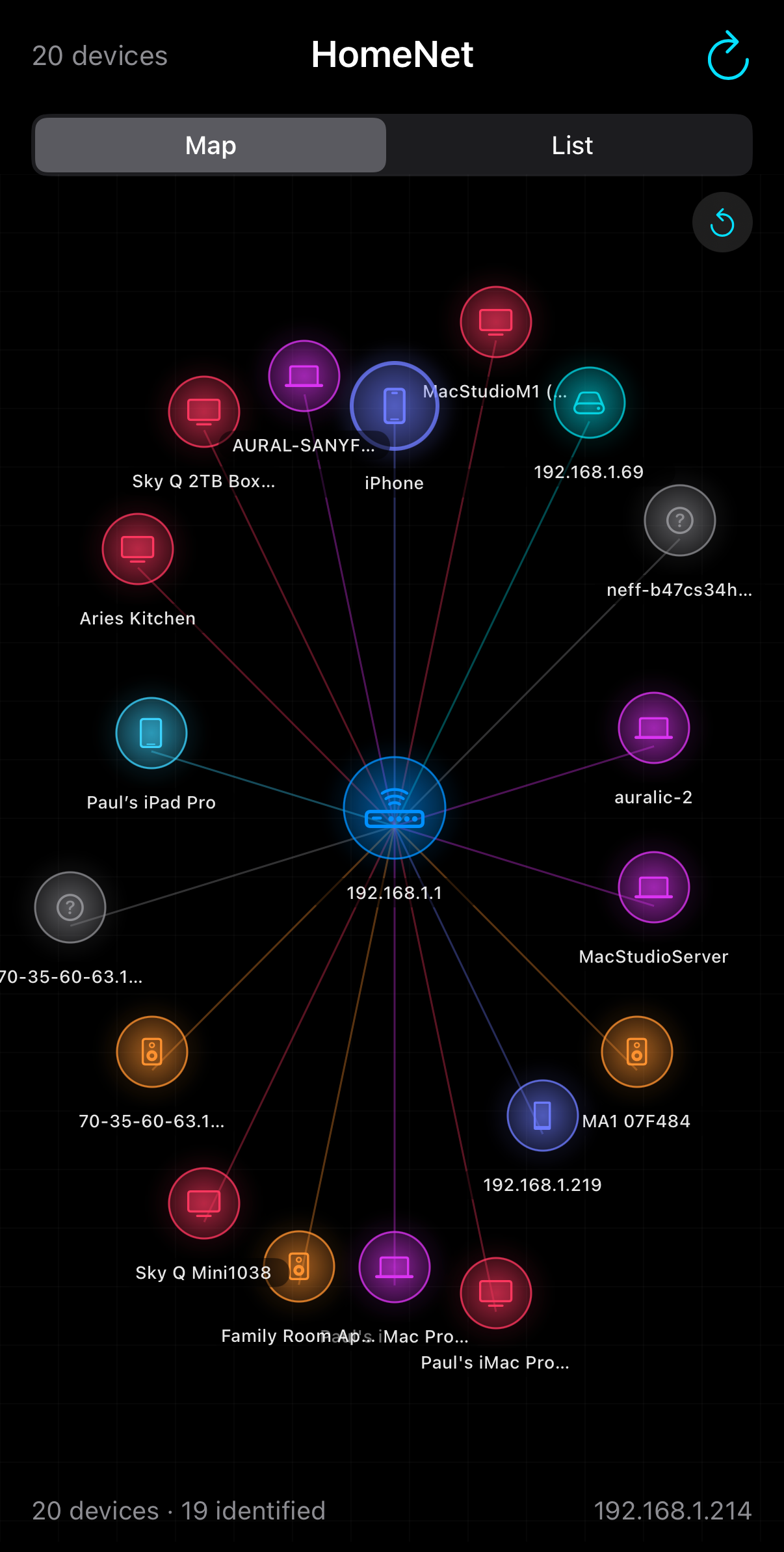
Running on iPhone 16 Pro
View Hierarchy
Navigation & Views
graph TD
    A[HomeNetApp] --> B[ContentView]
    B --> C{ViewMode Picker}
    C -->|Map| D[NetworkMapView]
    C -->|List| E[DeviceListView]
    D --> F[DeviceNode]
    E --> G[DeviceRow]
    B -->|Sheet| H[DeviceDetailView]
    H --> I[InfoRow]
    H --> J[FlowLayout]

    style A fill:#0f3460,stroke:#00d2d3,color:#e6edf3
    style B fill:#0f3460,stroke:#54a0ff,color:#e6edf3
    style D fill:#1c2a4a,stroke:#00d2d3,color:#e6edf3
    style E fill:#1c2a4a,stroke:#00d2d3,color:#e6edf3
    style H fill:#1c2a4a,stroke:#ff9f43,color:#e6edf3
Data Flow
Scan Pipeline
graph TD
    VM[NetworkViewModel] -->|starts| SCAN[performScan]
    SCAN --> NI["getifaddrs — Get IP/Subnet"]
    NI --> PAR{Parallel}
    PAR -->|async let| BJ[BonjourBrowser.browse]
    PAR -->|async let| SS[NetworkScanner.scanSubnet]
    BJ -->|8s window| BR["Bonjour Results"]
    SS -->|Batches of 25| IPS["Found IPs"]
    IPS --> BATCH["Identify Batches of 8"]
    BATCH --> RH[resolveHostname]
    BATCH --> OP[identifyOpenPorts]
    RH --> MATCH["Match Bonjour Services"]
    OP --> MATCH
    BR --> MATCH
    MATCH --> CL["DeviceClassifier.classify"]
    CL --> DEDUP["deduplicateByIP"]
    DEDUP --> UI["Update devices array"]
    UI -->|Published| MAP["Map/List Views"]

    style VM fill:#0f3460,stroke:#54a0ff,color:#e6edf3
    style PAR fill:#1c2a4a,stroke:#ff9f43,color:#e6edf3
    style CL fill:#1c2a4a,stroke:#00d2d3,color:#e6edf3
    style DEDUP fill:#1c2a4a,stroke:#00b894,color:#e6edf3
    style UI fill:#0f3460,stroke:#00b894,color:#e6edf3
    style MAP fill:#0f3460,stroke:#a29bfe,color:#e6edf3
Progressive Device Enrichment
graph LR
    A["IP Only"] -->|resolveHostname| B["+ Hostname"]
    B -->|identifyOpenPorts| C["+ Open Ports"]
    C -->|matchBonjour| D["+ Services"]
    D -->|classify| E["Categorised Device"]
    E -->|deepProbe| F["+ Probe Names"]

    style A fill:#30363d,stroke:#8b949e,color:#e6edf3
    style B fill:#1c2a4a,stroke:#54a0ff,color:#e6edf3
    style C fill:#1c2a4a,stroke:#ff9f43,color:#e6edf3
    style D fill:#1c2a4a,stroke:#a29bfe,color:#e6edf3
    style E fill:#0f3460,stroke:#00d2d3,color:#e6edf3
    style F fill:#0f3460,stroke:#00b894,color:#e6edf3
Each stage triggers a UI update via @Published. The custom Equatable
on NetworkDevice compares hostname, category, services, ports, and probe results so SwiftUI
detects every change. Bonjour names are matched to hostnames via normaliseName() which strips
domain suffixes (.lan, .local, .home.arpa), DNS disambiguation numbers
(-7), Bonjour instance suffixes ((920)), and RAOP hex prefixes.
A final deduplicateByIP() pass merges any remaining duplicates, preferring the richer device.
Display names are resolved from probe-discovered friendly names (AirPlay, UPnP, Chromecast),
then the longest Bonjour service name, then hostname, falling back to IP address.
Service Architecture
Concurrency Model
graph TD
    VM["@MainActor NetworkViewModel"] --> NS["actor NetworkScanner"]
    VM --> BB["@MainActor BonjourBrowser"]
    VM --> DP["actor DeviceProber"]
    VM --> DC["struct DeviceClassifier (static)"]
    NS --> CP["checkPort (NWConnection)"]
    NS --> RH["resolveHostname (getnameinfo)"]
    NS --> NI["getNetworkInfo (getifaddrs)"]
    BB --> NWB["NWBrowser x 24 service types"]
    CP --> CG["ContinuationGate (NSLock)"]
    DP --> HTTP["URLSession (HTTP/HTTPS)"]
    DP --> BAN["NWConnection (SSH/FTP banners)"]
    DP --> UPNP["URLSession (UPnP XML)"]

    style VM fill:#0f3460,stroke:#54a0ff,color:#e6edf3
    style NS fill:#1c2a4a,stroke:#00d2d3,color:#e6edf3
    style BB fill:#1c2a4a,stroke:#ff9f43,color:#e6edf3
    style DP fill:#1c2a4a,stroke:#a29bfe,color:#e6edf3
    style DC fill:#1c2a4a,stroke:#00b894,color:#e6edf3
    style CG fill:#30363d,stroke:#a29bfe,color:#e6edf3
Deep Probing Pipeline
Background Device Probing (after scan completes)
graph TD
    START[Scan Complete] -->|Background Task| PROBE[DeviceProber]
    PROBE --> HTTP["HTTP/HTTPS
Ports 80, 443, 8080, 8443"]
    PROBE --> SSH["SSH Banner
Port 22"]
    PROBE --> BAN["Service Banners
FTP 21, SMTP 25, RTSP 554"]
    PROBE --> UPNP["UPnP Discovery
description.xml, rootDesc.xml"]
    PROBE --> AIR["AirPlay /info
Port 7000"]
    PROBE --> CAST["Chromecast eureka_info
Port 8008"]
    PROBE --> LAT["TCP Latency
Wired vs WiFi inference"]
    HTTP --> ENTRIES[ProbeEntry array]
    SSH --> ENTRIES
    BAN --> ENTRIES
    UPNP --> ENTRIES
    AIR --> ENTRIES
    CAST --> ENTRIES
    LAT --> ENTRIES
    ENTRIES --> CLASS[Reclassify with probe data]
    CLASS --> UI["Update device + UI"]

    style START fill:#0f3460,stroke:#54a0ff,color:#e6edf3
    style PROBE fill:#1c2a4a,stroke:#a29bfe,color:#e6edf3
    style HTTP fill:#1c2a4a,stroke:#ff9f43,color:#e6edf3
    style SSH fill:#1c2a4a,stroke:#00d2d3,color:#e6edf3
    style UPNP fill:#1c2a4a,stroke:#00b894,color:#e6edf3
    style AIR fill:#1c2a4a,stroke:#a29bfe,color:#e6edf3
    style CAST fill:#1c2a4a,stroke:#ff9f43,color:#e6edf3
    style LAT fill:#1c2a4a,stroke:#00d2d3,color:#e6edf3
    style ENTRIES fill:#30363d,stroke:#a29bfe,color:#e6edf3
    style UI fill:#0f3460,stroke:#00b894,color:#e6edf3
Probing runs as a separate Task after the scan declares completion. Each batch of 4
devices is probed in parallel. Results update the device array progressively via @Published,
so the map and detail views update in real time as probe data arrives.
Classification Priority
graph TD
    START[Device to classify] --> GW{Is Gateway?}
    GW -->|Yes| ROUTER[Router]
    GW -->|No| TXT{Has TXT model ID?}
    TXT -->|Yes| TXTC[Classify by Apple model ID]
    TXT -->|No| SVC{Has Bonjour Services?}
    SVC -->|Yes| ST[Classify by service type]
    SVC -->|No| PRB{Has Probe Results?}
    PRB -->|Yes| PRBC[Classify by probes]
    PRB -->|No| HN{Has Hostname?}
    HN -->|Yes| HNC[Classify by hostname patterns]
    HN -->|No| PT{Has Open Ports?}
    PT -->|Yes| PTC[Classify by port fingerprint]
    PT -->|No| UNK[Unknown]

    style ROUTER fill:#0f3460,stroke:#54a0ff,color:#e6edf3
    style ST fill:#1c2a4a,stroke:#00d2d3,color:#e6edf3
    style HNC fill:#1c2a4a,stroke:#ff9f43,color:#e6edf3
    style PTC fill:#1c2a4a,stroke:#a29bfe,color:#e6edf3
    style UNK fill:#30363d,stroke:#8b949e,color:#e6edf3
Device Categories
| Category | Radius | Colour | Identified By |
|---|---|---|---|
| Router | Centre | Blue | Gateway IP |
| Phone | 0.70 | Indigo | Port 62078, hostname |
| Apple | 0.75 | Cyan | _companion-link, _device-info |
| Computer | 0.80 | Purple | SSH, Screen Sharing, hostname |
| Speaker | 0.85 | Orange | Sonos, Spotify Connect |
| Gaming | 0.88 | Red | Hostname patterns |
| TV & Media | 0.90 | Pink | Chromecast, AirPlay |
| Storage | 0.92 | Teal | NAS hostname, SMB |
| Printer | 0.95 | Green | IPP, _printer, _scanner |
| Smart Home | 0.98 | Yellow | HomeKit, HAP, Thread |
| Unknown | 1.00 | Grey | Fallback |
Map Interaction
graph TD
    MAP[NetworkMapView] --> ZOOM[MagnificationGesture 0.5x-4x]
    MAP --> PAN[DragGesture]
    MAP --> TAP[Tap DeviceNode]
    TAP --> SHEET[DeviceDetailView Sheet]
    MAP --> RESET[Reset Button]
    MAP --> GRID[Canvas Grid Background]
    MAP --> PULSE[Scan Pulse Animation]
    MAP --> LINES[Canvas Connection Lines]

    style MAP fill:#0f3460,stroke:#54a0ff,color:#e6edf3
    style ZOOM fill:#1c2a4a,stroke:#00d2d3,color:#e6edf3
    style PAN fill:#1c2a4a,stroke:#00d2d3,color:#e6edf3
    style SHEET fill:#1c2a4a,stroke:#ff9f43,color:#e6edf3