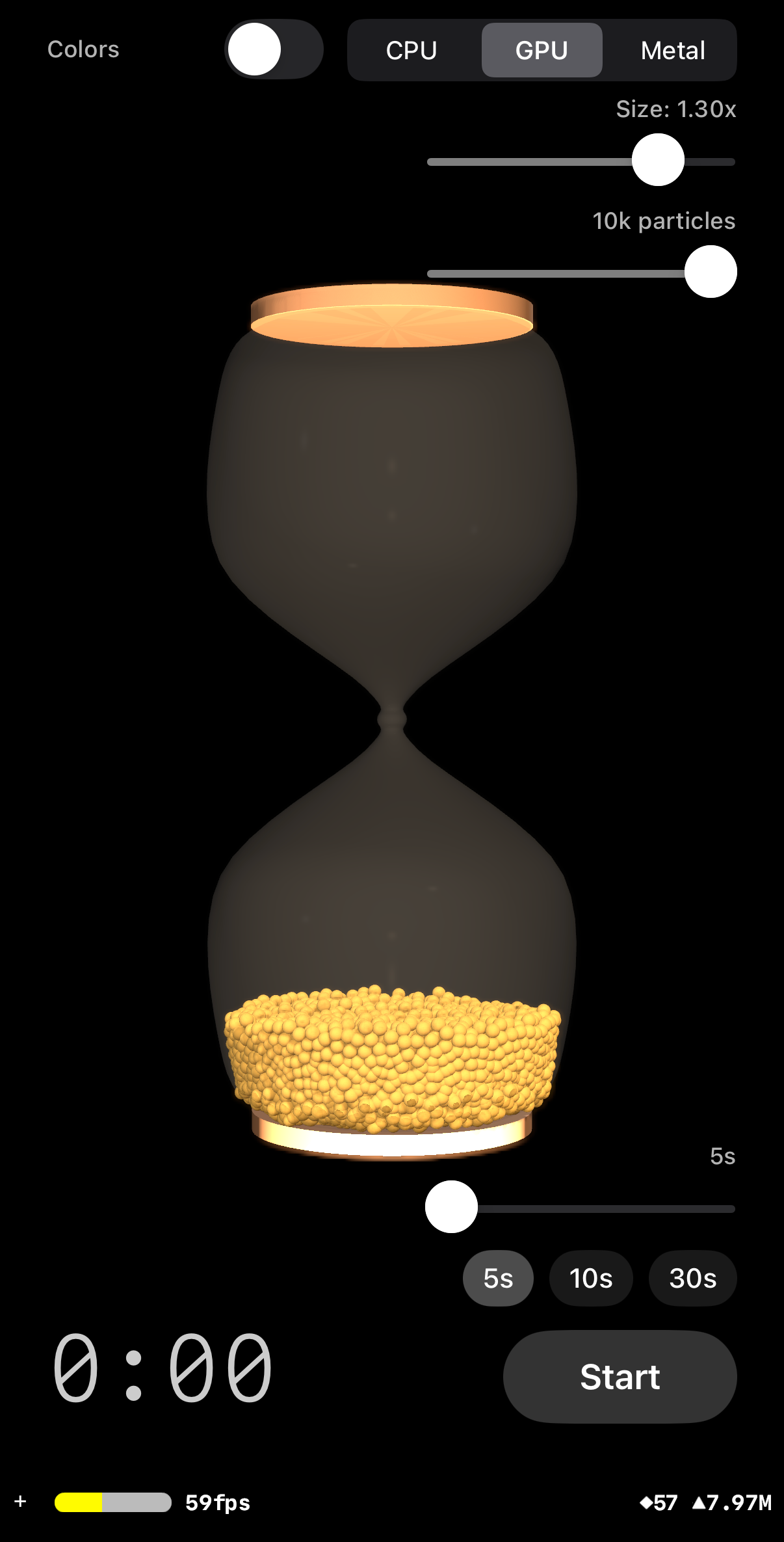
Running on iPhone 16 Pro
iOS Application Architecture
Running on iPhone 16 Pro
The app follows MVVM. The SwiftUI ContentView observes a TimerViewModel, which drives
a SceneKit scene via a UIViewRepresentable bridge. Three physics/rendering modes: CPU
(O(N²) on one thread), GPU (Metal compute + SceneKit node readback), and Metal
instanced (Metal compute + mesh expansion, zero CPU readback). All hourglass geometry
is procedurally generated — no imported 3D models. Gravity scales inversely with
duration: max(5.0/duration, 0.15) — full gravity at 5s, reduced for
longer durations. A random colors toggle enables per-particle colour variation via
random-hue materials (CPU/GPU) or a GPU color buffer (Metal). CLI launch arguments
(-mode, -count, -size, -dumpspawn)
enable automated testing. A ShiftingSandsTests target has 16 tests covering CPU and GPU
physics engines.
    graph TD
        A["ContentView
SwiftUI overlay + color toggle"] -->|"@StateObject"| B["TimerViewModel
@MainActor"]
        A --> C["HourglassSceneView
UIViewRepresentable"]
        C -->|"makeCoordinator()"| D["Coordinator
SCNSceneRendererDelegate"]
        D -->|"owns"| E["HourglassScene
SCNScene builder"]
        E -->|"glass from"| F["SandGeometry
dynamic profiles"]
        E -->|"CPU physics"| G["GranularSimulation
O(N squared) CPU"]
        E -->|"GPU/Metal physics"| H["MetalPhysicsEngine
Metal compute + mesh expansion
+ color buffer"]
        E -->|"thread safety"| LOCK["NSLock
particleLock"]
        B -->|"particleCount, duration,
randomColors, physicsMode
(UserDefaults)"| D
        CLI["CLI Args
-mode, -count,
-size, -dumpspawn"] -.->|"override on launch"| B
        TESTS["ShiftingSandsTests
16 tests: CPUPhysicsTests (10)
GPUPhysicsTests (6)"] -.->|"tests"| G
        TESTS -.->|"tests"| H

        style A fill:#2e2620,stroke:#d4a853,color:#e8ddd0
        style B fill:#2e2620,stroke:#d4a853,color:#e8ddd0
        style C fill:#2e2620,stroke:#c47d2e,color:#e8ddd0
        style D fill:#2e2620,stroke:#c47d2e,color:#e8ddd0
        style E fill:#2e2620,stroke:#c47d2e,color:#e8ddd0
        style F fill:#2e2620,stroke:#8b6e3a,color:#e8ddd0
        style G fill:#2e2620,stroke:#c47d2e,color:#e8ddd0
        style H fill:#2e2620,stroke:#d4a853,color:#e8ddd0
        style LOCK fill:#2e2620,stroke:#8b6e3a,color:#e8ddd0
        style CLI fill:#2e2620,stroke:#8b6e3a,color:#e8ddd0
        style TESTS fill:#2e2620,stroke:#8b6e3a,color:#e8ddd0
All hourglass geometry lives under a container node so the entire hourglass can rotate during the flip animation. Camera and lights stay fixed on the root node. CPU/GPU modes use N individual sphere nodes (with optional per-node random-hue materials when random colors is enabled); Metal mode uses a single mesh node with per-vertex color.
    graph TD
        ROOT["scene.rootNode"] --> HC["hourglassContainer
rotates during flip"]
        ROOT --> CAM["cameraNode
FOV 40, z=3.0"]
        ROOT --> LIGHTS["5 light nodes
key=120, front=100, fill=60,
rim=60, bottom=8, env=0.08"]

        HC --> OG["outerGlassNode
Blinn material, visible"]
        HC --> IG["innerGlassNode
invisible, physics collider"]
        HC --> TC["topCapNode"]
        HC --> BC["bottomCapNode"]
        HC --> PC["particlesContainer
CPU/GPU modes"]
        PC --> S1["sphere node 1"]
        PC --> S2["sphere node 2"]
        PC --> SN["sphere node N
shared or per-node SCNSphere
+ sand Lambert (random hue optional)"]
        HC --> RN["rendererNode
Metal mode only"]
        RN --> MG["SCNGeometry from MTLBuffer
icosahedron mesh per particle (42 verts)
+ per-vertex color"]

        style ROOT fill:#241e17,stroke:#d4a853,color:#e8ddd0
        style HC fill:#2e2620,stroke:#d4a853,color:#e8ddd0
        style CAM fill:#241e17,stroke:#8b6e3a,color:#e8ddd0
        style LIGHTS fill:#241e17,stroke:#8b6e3a,color:#e8ddd0
        style OG fill:#2e2620,stroke:#8b6e3a,color:#e8ddd0
        style IG fill:#2e2620,stroke:#8b6e3a,color:#e8ddd0
        style TC fill:#2e2620,stroke:#8b6e3a,color:#e8ddd0
        style BC fill:#2e2620,stroke:#8b6e3a,color:#e8ddd0
        style PC fill:#2e2620,stroke:#c47d2e,color:#e8ddd0
        style S1 fill:#2e2620,stroke:#c47d2e,color:#e8ddd0
        style S2 fill:#2e2620,stroke:#c47d2e,color:#e8ddd0
        style SN fill:#2e2620,stroke:#c47d2e,color:#e8ddd0
        style RN fill:#2e2620,stroke:#d4a853,color:#e8ddd0
        style MG fill:#2e2620,stroke:#d4a853,color:#e8ddd0
The timer uses a two-phase start: tapping Start triggers a 1.2-second flip animation, and the actual countdown only begins when the animation completes. Particles tumble with real physics during the flip.
    stateDiagram-v2
        [*] --> Resting: App launch
        Resting --> Flipping: startFlip()
        Flipping --> Running: completeFlip()
        Running --> Complete: elapsed >= duration
        Complete --> Resting: reset() respawns particles
        Running --> Resting: reset() respawns particles
        Flipping --> Resting: reset()

        Resting: particles settled at bottom
        Resting: all controls visible and enabled
        Resting: presets — 5s, 10s, 30s
        Resting: duration 5-30s (default 5s)
        Resting: physics mode picker (CPU/GPU/Metal)
        Flipping: isFlipping=true
        Flipping: rebuilds particles if settings changed
        Flipping: 180 rotation, real physics tumble
        Flipping: top-right controls always enabled
        Running: isRunning=true
        Running: particles flow through neck
        Running: gravity scales with duration
        Running: mode change triggers restart
        Complete: isComplete=true
        Complete: particles at rest
        Complete: respawns particles on transition
Each frame, the CPU physics engine runs multiple substeps. Within each substep: apply gravity, update positions, then resolve collisions (wall, floor/ceiling, sphere-sphere), and apply damping. Substep count adapts to particle count for frame rate.
    graph TD
        subgraph "Per Frame (120fps)"
            DT["Compute dt
clamped to 1/30s max"]
            EULER["Read container euler angle
presentation.eulerAngles.x"]
        end

        subgraph "Per Substep (4x)"
            GRAV["Apply gravity
gravity=max(5.0/duration, 0.15),
rotated by container angle"]
            POS["Update positions
p += v * subDt"]
            WALL["Wall collision
radial vs innerRadiusAt(y)"]
            FLOOR["Floor/ceiling bounds
Y clamp with restitution"]
            SPHERE["Sphere-sphere collision
O(N squared) sequential"]
            NECK["Neck friction zone
neckDamping=duration*0.02
where abs(y) < 0.10"]
            DAMP["Velocity-dependent damping
flow=0.92, settle=0.05
blend by speed/0.15"]
        end

        SYNC["Sync SCNNode positions"]

        DT --> EULER --> GRAV --> POS --> WALL --> FLOOR --> SPHERE --> NECK --> DAMP
        DAMP -->|"repeat substeps"| GRAV
        DAMP --> SYNC

        style DT fill:#2e2620,stroke:#8b6e3a,color:#e8ddd0
        style EULER fill:#2e2620,stroke:#8b6e3a,color:#e8ddd0
        style GRAV fill:#2e2620,stroke:#d4a853,color:#e8ddd0
        style POS fill:#2e2620,stroke:#d4a853,color:#e8ddd0
        style WALL fill:#2e2620,stroke:#c47d2e,color:#e8ddd0
        style FLOOR fill:#2e2620,stroke:#c47d2e,color:#e8ddd0
        style SPHERE fill:#2e2620,stroke:#c47d2e,color:#e8ddd0
        style NECK fill:#2e2620,stroke:#d4a853,color:#e8ddd0
        style DAMP fill:#2e2620,stroke:#8b6e3a,color:#e8ddd0
        style SYNC fill:#2e2620,stroke:#d4a853,color:#e8ddd0
max(5.0/duration, 0.15). At 5s: 1.0 (full). At 30s: ~0.17.
Two damping layers: neck friction near the constriction
and velocity-dependent damping (blend between flow and settle based on speed).
CPU’s sequential collision converges naturally — no sleep system needed.
Spawn overflow: the hex lattice fills from the bottom up to y=-0.10
(well below the neck); at low counts it stops early. Particles that cannot fit in the hex
lattice are placed randomly in the lower chamber (y=-0.48 to -0.10), never near the neck
or in the upper chamber.
The GPU engine parallelises the same physics across Metal compute threads. Each thread handles one particle: reads all others from buffer A, resolves all collisions, writes result to buffer B. Buffers swap after each substep. Double-buffering prevents race conditions in parallel collision resolution.
    graph TD
        subgraph "Per Frame (120fps)"
            DT2["Compute dt, euler angle"]
        end

        subgraph "Per Substep (adaptive: 4/3/2/1)"
            UNI["Fill PhysicsUniforms
gravity=max(5.0/duration, 0.15),
neckDamping=duration*0.02,
neckHalfHeight=0.10,
damping, subDt, euler"]
            ENC["Encode physicsStep kernel
bufferA read, bufferB write"]
            DISP["Dispatch N threads
256 per threadgroup"]
            WAIT["waitUntilCompleted"]
            SWAP["Swap bufferA / bufferB"]
        end

        subgraph "Per Thread (one particle)"
            TSLEEP_CHK["Two-tier sleep check
counter > 30: deep sleep
(staggered every 30 frames:
verify floor or nearby particle
at 1.05x dist, wake if none)
counter 16-30: light sleep
(O(N) scan: wake only if
non-sleeping neighbor approaching)"]
            TGRAV["Apply rotated gravity"]
            TPOS["Update position"]
            TWALL["Wall collision
256-entry profile lookup"]
            TFLOOR["Floor/ceiling clamp
+ resting contact: zero vel.y
if vel.y < gravity*subDt*2"]
            TSPHERE["Chamber-asymmetric collision
O(N squared): position correction
0.25 everywhere; velocity impulse
0.25 lower chamber only
(upper: skip impulse, gravity drains)
tracks contactCount for sleep"]
            TNECK["Neck friction
neckDamping where abs(y) < 0.10"]
            TDAMP["Chamber-dependent damping
upper: flow only pow(0.92, subDt)
lower: blend flow/settle by speed"]
            TCUTOFF["Velocity cutoff
lower chamber + hasSupport only:
snap to zero if speed < 0.01
free-falling particles never frozen
(upper must accumulate gravity)"]
            TSLEEP["Sleep counter update
upper chamber: always 0 (awake)
lower chamber + hasSupport:
speed < 0.08 increments counter
no contacts: counter stays 0"]
        end

        READ["readPositions() -> [GPUParticle]
safe copy from bufferA"]
        SYNC2["Sync SCNNode positions
under particleLock"]

        DT2 --> UNI --> ENC --> DISP --> WAIT --> SWAP
        SWAP -->|"repeat substeps"| UNI
        SWAP --> READ --> SYNC2

        DISP -.->|"each thread"| TSLEEP_CHK --> TGRAV --> TPOS --> TWALL --> TFLOOR --> TSPHERE --> TNECK --> TDAMP --> TCUTOFF --> TSLEEP

        style DT2 fill:#2e2620,stroke:#8b6e3a,color:#e8ddd0
        style UNI fill:#2e2620,stroke:#d4a853,color:#e8ddd0
        style ENC fill:#2e2620,stroke:#d4a853,color:#e8ddd0
        style DISP fill:#2e2620,stroke:#c47d2e,color:#e8ddd0
        style WAIT fill:#2e2620,stroke:#8b6e3a,color:#e8ddd0
        style SWAP fill:#2e2620,stroke:#d4a853,color:#e8ddd0
        style TGRAV fill:#2e2620,stroke:#c47d2e,color:#e8ddd0
        style TPOS fill:#2e2620,stroke:#c47d2e,color:#e8ddd0
        style TWALL fill:#2e2620,stroke:#c47d2e,color:#e8ddd0
        style TFLOOR fill:#2e2620,stroke:#c47d2e,color:#e8ddd0
        style TSLEEP_CHK fill:#2e2620,stroke:#d4a853,color:#e8ddd0
        style TSPHERE fill:#2e2620,stroke:#c47d2e,color:#e8ddd0
        style TNECK fill:#2e2620,stroke:#d4a853,color:#e8ddd0
        style TDAMP fill:#2e2620,stroke:#c47d2e,color:#e8ddd0
        style TCUTOFF fill:#2e2620,stroke:#c47d2e,color:#e8ddd0
        style TSLEEP fill:#2e2620,stroke:#d4a853,color:#e8ddd0
        style READ fill:#2e2620,stroke:#d4a853,color:#e8ddd0
        style SYNC2 fill:#2e2620,stroke:#d4a853,color:#e8ddd0
pow(0.92, subDt)) to preserve natural fall; lower chamber blends between
flow and aggressive settle damping (pow(0.05, subDt)) based on speed.
Gravity scaling: gravity is no longer constant — it scales inversely
with duration: max(5.0/duration, 0.15). At 5s: full gravity (1.0). At 30s:
reduced (~0.17). Both CPU and GPU engines receive the scaled gravity value per frame
from the Coordinator.
Contact-based sleep: the GPU sleep/freeze system tracks
contactCount during the O(N²) collision loop. Only particles with
contacts (hasSupport = contactCount > 0) can have velocity zeroed or
enter sleep. Free-falling particles (zero contacts) never freeze, preventing mid-air
freezing artifacts.
Velocity cutoff lower-chamber + hasSupport only: snap to zero if
speed < 0.01, but only when the particle is in the lower chamber AND has contacts.
Upper-chamber particles must accumulate gravity to begin draining.
Sleep counter lower-chamber + hasSupport only: upper-chamber particles
always have counter=0 (always awake, must drain). Lower chamber uses threshold 0.08
but only increments when hasSupport is true.
Two-tier sleep system: counter 16–30 is “light sleep” (O(N) wake-up
check, wakes only if a non-sleeping neighbor is approaching fast;
sleepContactCount was removed from light sleep because it caused
oscillation/blur through the glass — support-loss detection is deferred to deep sleep).
Counter >30 is “deep sleep” (staggered support check
every 30 frames, offset by thread ID, so ~N/30 particles check per frame: floor
contact counts as support via cheap check, otherwise scans for nearby particles within
1.05× touching distance; if no support found, particle wakes and falls within ~0.5s.
Staggering reduces deep sleep overhead from O(N²) to O(N²/30) per frame).
snapAfterFlip also resets all counters to 0.
Floor/ceiling resting contact: vel.y zeroed if
abs(vel.y) < gravity * subDt * 2.0, preventing micro-bouncing on flat surfaces.
Metal mode eliminates the CPU readback bottleneck. The same GPU physics runs, then a
second compute kernel expands each particle into a subdivided icosahedron mesh (42 verts,
80 faces). SceneKit renders the expanded mesh geometry directly
from the GPU buffer — zero CPU copies. Supports up to 50,000 particles.
Uses Lambert material with UIColor(white: 0.78) diffuse to match CPU/GPU brightness.
When random colors is enabled, a per-particle color buffer feeds into the mesh expansion
kernel, producing per-vertex color via SCNGeometrySource(.color).
    graph TD
        subgraph "Per Frame"
            PHYS["Physics Compute
physicsStep kernel
(same as GPU mode)"]
            MESH["Mesh Expansion Compute
expandMeshes kernel
particle → 42 icosahedron verts"]
            GEOM["Rebuild SCNGeometry
SCNGeometrySource(buffer:)
wraps vertex MTLBuffer
+ SCNGeometrySource(.color)"]
        end

        subgraph "Mesh Expansion Per Thread"
            READ_P["Read particle position
from physics bufferA"]
            READ_C["Read particle color
from colorBuffer (uchar4)"]
            WRITE_V["Write MeshVertex
packed_float3 pos + normal
+ uchar4 color = 28 bytes"]
        end

        subgraph "Rendering"
            NODE["rendererNode
child of hourglassContainer"]
            SCNR["SceneKit Standard Pipeline
Lambert material (white: 0.78),
depth, lighting
per-vertex color override"]
        end

        PHYS --> MESH --> GEOM --> NODE --> SCNR
        MESH -.->|"N * 42 threads"| READ_P --> READ_C --> WRITE_V

        style PHYS fill:#2e2620,stroke:#d4a853,color:#e8ddd0
        style MESH fill:#2e2620,stroke:#d4a853,color:#e8ddd0
        style GEOM fill:#2e2620,stroke:#c47d2e,color:#e8ddd0
        style READ_P fill:#2e2620,stroke:#c47d2e,color:#e8ddd0
        style READ_C fill:#2e2620,stroke:#d4a853,color:#e8ddd0
        style WRITE_V fill:#2e2620,stroke:#c47d2e,color:#e8ddd0
        style NODE fill:#2e2620,stroke:#d4a853,color:#e8ddd0
        style SCNR fill:#2e2620,stroke:#8b6e3a,color:#e8ddd0
readPositions()) and updates N individual SCNNodes per frame. Metal mode
keeps everything on GPU — the mesh expansion kernel writes vertices that SceneKit
reads directly via SCNGeometrySource(buffer:). One geometry node replaces
N sphere nodes. The index buffer (icosahedron topology × N particles) is pre-computed
and static; only the vertex buffer changes each frame. Uses Lambert material with
UIColor(white: 0.78) diffuse to match CPU/GPU brightness.
Per-vertex color: MeshVertex is 28 bytes
(packed_float3 position + packed_float3 normal + uchar4 color).
When random colors is enabled, MetalPhysicsEngine.setupColors(random:) fills
a colorBuffer with per-particle uchar4 RGBA values. The
expandMeshes kernel reads each particle’s color and writes it into every
vertex of that particle’s icosahedron. SceneKit picks up the color via an
SCNGeometrySource(.color) semantic on the same vertex buffer.
The hourglass glass shape is defined by control points, interpolated into a smooth profile, then revolved around the Y axis. The neck width adjusts dynamically based on particle size so exactly one ball fits through at a time.
    graph TD
        PC["Particle Count + Size
CPU: 50-250, GPU: 50-10k,
Metal: 50-50k, size: 0.5x-1.5x"] -->|"radiusForCount(count, sizeMultiplier)"| PR["Particle Radius
0.030 * (100/N)^(1/3)
* packing correction * sizeMultiplier"]
        PR -->|"r + wall + clearance"| NR["Neck Radius
setNeckRadius()"]
        NR --> CP["11 Control Points
dynamic neck point"]
        CP -->|"Catmull-Rom spline"| SP["~80 Smooth Points"]
        SP -->|"rotate around Y"| SR["Surface of Revolution
64 angular segments"]
        SR --> OG["Outer Glass
Blinn, transparent"]
        SR --> IG["Inner Glass
invisible collider"]
        SP -->|"activeInnerProfile"| IR["innerRadiusAt(y)
wall collision lookup"]
        IR -->|"sample 256 points"| LUT["GPU Profile Table
256-entry MTLBuffer"]

        style PC fill:#2e2620,stroke:#d4a853,color:#e8ddd0
        style PR fill:#2e2620,stroke:#d4a853,color:#e8ddd0
        style NR fill:#2e2620,stroke:#c47d2e,color:#e8ddd0
        style CP fill:#2e2620,stroke:#8b6e3a,color:#e8ddd0
        style SP fill:#2e2620,stroke:#d4a853,color:#e8ddd0
        style SR fill:#2e2620,stroke:#d4a853,color:#e8ddd0
        style OG fill:#2e2620,stroke:#c47d2e,color:#e8ddd0
        style IG fill:#2e2620,stroke:#c47d2e,color:#e8ddd0
        style IR fill:#2e2620,stroke:#c47d2e,color:#e8ddd0
        style LUT fill:#2e2620,stroke:#d4a853,color:#e8ddd0
The flip exploits the glass's Y-axis symmetry: rotating 180 degrees produces an identical shape. Flip start rebuilds particles only if count/size/color settings changed. Particles tumble with real physics as gravity rotates with the container. Snap-back runs on CPU or GPU depending on active physics mode.
    sequenceDiagram
        participant U as User
        participant VM as TimerViewModel
        participant SV as SceneView
        participant HS as HourglassScene
        participant PHY as Physics Engine

        U->>VM: tap Start
        VM->>VM: startFlip() isFlipping=true
        SV->>HS: flipAndStart(completion)
        HS->>HS: SCNAction.rotateBy(x: pi, 1.2s)
        Note over HS,PHY: Each frame during rotation:
        PHY->>PHY: read presentation.eulerAngles.x
        PHY->>PHY: compute rotated gravity
        PHY->>PHY: step physics (balls tumble)
        HS->>HS: sync node positions (CPU/GPU)
or rebuild mesh geometry (Metal)
        Note over HS: rotation completes
        HS->>HS: snap eulerAngles to (0,0,0)
        HS->>PHY: snapAfterFlip() (CPU or GPU kernel)
        HS->>HS: sync positions / rebuild geometry
        HS->>VM: completion -> completeFlip()
        VM->>VM: isRunning=true, start timer task
Published properties flow from the ViewModel through the SwiftUI bridge into SceneKit.
The render delegate dispatches to CPU, GPU, or Metal instanced physics and syncs
positions every frame. Per-mode particle counts, duration, and random colors preference
are persisted independently in UserDefaults. The Coordinator computes gravity scaling
(max(5.0/duration, 0.15)) each frame and sets it on both CPU and GPU engines.
CLI launch arguments (-mode, -count, -size,
-dumpspawn) override persisted settings on launch for automated testing.
Manual Reset respawns particles; natural completion leaves them at rest.
Flip start rebuilds only if settings changed.
    graph TD
        UD["UserDefaults
physicsMode, duration,
randomColors,
particleCount_CPU/GPU/Metal,
particleSize_CPU/GPU/Metal"]
        CLI2["CLI Args
-mode, -count, -size,
-dumpspawn"]
        VM["TimerViewModel
@Published: duration (5-30s),
elapsed, isRunning, isFlipping,
isComplete, particleCount,
particleSizeMultiplier,
physicsMode, randomColors"]

        UD -->|"load on init"| VM
        CLI2 -.->|"override on launch"| VM
        VM -->|"save on change"| UD
        VM -->|"SwiftUI binding"| CV["ContentView
top-left: color toggle
top-right: mode picker + particle slider
+ size slider
bottom-left: readout
bottom-right: duration slider (5-30s)
+ presets (5s/10s/30s) + start/reset"]
        VM -->|"updateUIView()"| COORD["Coordinator
tracks physicsMode,
isFlipping, particleCount,
sizeMultiplier, randomColors,
currentDuration,
sets neckDamping + gravityScale
(max(5.0/duration, 0.15)) each frame"]
        COORD -->|"renderer(updateAtTime:)"| HS["HourglassScene"]
        HS -->|"CPU mode"| CPU["GranularSimulation
O(N squared) single thread
+ SCNNode sync
+ Lambert, 24-color palette"]
        HS -->|"GPU mode"| GPU["MetalPhysicsEngine
Metal compute
+ readPositions() + SCNNode sync
+ Lambert, 24-color palette"]
        HS -->|"Metal mode"| MTL["MetalPhysicsEngine
Metal compute
+ setupColors(random:)
+ expandMeshes() with colorBuffer
+ SCNGeometry with per-vertex color"]

        style UD fill:#2e2620,stroke:#8b6e3a,color:#e8ddd0
        style CLI2 fill:#2e2620,stroke:#8b6e3a,color:#e8ddd0
        style VM fill:#2e2620,stroke:#d4a853,color:#e8ddd0
        style CV fill:#2e2620,stroke:#c47d2e,color:#e8ddd0
        style COORD fill:#2e2620,stroke:#c47d2e,color:#e8ddd0
        style HS fill:#2e2620,stroke:#8b6e3a,color:#e8ddd0
        style CPU fill:#2e2620,stroke:#c47d2e,color:#e8ddd0
        style GPU fill:#2e2620,stroke:#d4a853,color:#e8ddd0
        style MTL fill:#2e2620,stroke:#d4a853,color:#e8ddd0
The MetalPhysicsEngine manages double-buffered particle data, a pre-computed profile
lookup table, a per-particle color buffer, and dispatches compute kernels via MTLCommandQueue.
Three pipelines: physics step, snap-after-flip, and mesh expansion for Metal instanced mode.
The color buffer is populated by setupColors(random:) and read by the
expandMeshes kernel to produce per-vertex color in each MeshVertex (28 bytes).
    graph TD
        ME["MetalPhysicsEngine"] -->|"owns"| DEV["MTLDevice"]
        ME -->|"owns"| CQ["MTLCommandQueue"]
        ME -->|"owns"| PP["physicsPipeline
MTLComputePipelineState"]
        ME -->|"owns"| SP2["snapPipeline
MTLComputePipelineState"]
        ME -->|"owns"| MP["meshExpansionPipeline
MTLComputePipelineState"]

        ME -->|"double buffer"| BA["bufferA
MTLBuffer shared"]
        ME -->|"double buffer"| BB["bufferB
MTLBuffer shared"]
        ME -->|"wall profile"| PB["profileBuffer
256 floats"]
        ME -->|"per-particle color"| CB["colorBuffer
N * uchar4 RGBA"]
        ME -->|"mesh output"| VB["meshVertexBuffer
N * 42 MeshVertex (28B each)"]
        ME -->|"static indices"| IB["meshIndexBuffer
N * 240 UInt32"]

        BA -->|"read"| K["physicsStep kernel"]
        BB -->|"write"| K
        PB -->|"lookup"| K

        BA -->|"read"| MK["expandMeshes kernel"]
        CB -->|"read"| MK
        VB -->|"write"| MK

        BA -->|"GPU mode only"| COPY["readPositions()
safe copy to CPU"]
        K -->|"per thread"| T["GPUParticle
float4 pos+r
float4 vel+pad"]
        CB -.->|"setupColors(random:)"| SC["Per-particle RGBA
random hue or golden sand"]

        style ME fill:#2e2620,stroke:#d4a853,color:#e8ddd0
        style DEV fill:#2e2620,stroke:#8b6e3a,color:#e8ddd0
        style CQ fill:#2e2620,stroke:#8b6e3a,color:#e8ddd0
        style PP fill:#2e2620,stroke:#c47d2e,color:#e8ddd0
        style SP2 fill:#2e2620,stroke:#c47d2e,color:#e8ddd0
        style MP fill:#2e2620,stroke:#d4a853,color:#e8ddd0
        style BA fill:#2e2620,stroke:#d4a853,color:#e8ddd0
        style BB fill:#2e2620,stroke:#d4a853,color:#e8ddd0
        style PB fill:#2e2620,stroke:#c47d2e,color:#e8ddd0
        style CB fill:#2e2620,stroke:#d4a853,color:#e8ddd0
        style VB fill:#2e2620,stroke:#d4a853,color:#e8ddd0
        style IB fill:#2e2620,stroke:#8b6e3a,color:#e8ddd0
        style K fill:#2e2620,stroke:#d4a853,color:#e8ddd0
        style MK fill:#2e2620,stroke:#d4a853,color:#e8ddd0
        style T fill:#2e2620,stroke:#c47d2e,color:#e8ddd0
        style COPY fill:#2e2620,stroke:#d4a853,color:#e8ddd0
        style SC fill:#2e2620,stroke:#c47d2e,color:#e8ddd0
The three modes share the same physics (gravity, collision, neck friction) but differ in where computation happens and how particles are rendered.
    graph TD
        subgraph "CPU Mode (up to 250)"
            C1["CPU Physics
O(N squared) single thread"]
            C2["N SCNNodes
shared or per-node SCNSphere
Lambert material
24-color palette (random colors)"]
            C1 -->|"position sync"| C2
        end

        subgraph "GPU Mode (up to 10k)"
            G1["GPU Physics
Metal compute kernel"]
            G2["readPositions()
CPU copy from bufferA"]
            G3["N SCNNodes
shared or per-node SCNSphere
Lambert material
24-color palette (random colors)"]
            G1 --> G2 -->|"position sync"| G3
        end

        subgraph "Metal Mode (up to 50k)"
            M1["GPU Physics
Metal compute kernel"]
            M2["expandMeshes
Metal compute kernel
+ colorBuffer lookup"]
            M3["1 SCNNode
SCNGeometry from MTLBuffer
Lambert material (white: 0.78)
per-vertex color (28B MeshVertex)"]
            M1 --> M2 -->|"zero copy"| M3
        end

        style C1 fill:#2e2620,stroke:#c47d2e,color:#e8ddd0
        style C2 fill:#2e2620,stroke:#c47d2e,color:#e8ddd0
        style G1 fill:#2e2620,stroke:#d4a853,color:#e8ddd0
        style G2 fill:#2e2620,stroke:#c47d2e,color:#e8ddd0
        style G3 fill:#2e2620,stroke:#c47d2e,color:#e8ddd0
        style M1 fill:#2e2620,stroke:#d4a853,color:#e8ddd0
        style M2 fill:#2e2620,stroke:#d4a853,color:#e8ddd0
        style M3 fill:#2e2620,stroke:#d4a853,color:#e8ddd0
Launch arguments enable automated testing without manual interaction.
-test sets a 10-second duration, auto-starts the timer, and on completion
dumps all particle positions and velocities to
Documents/test_results.txt.
-autostart just auto-starts the timer without the data dump.
-multicolor enables the random colors mode on launch.
-mode CPU|GPU|Metal overrides the physics mode.
-count N overrides the particle count.
-size X overrides the particle size multiplier.
-dumpspawn enables spawn position logging.
The ShiftingSandsTests target contains 16 unit tests for the physics engines (10 CPU, 6 GPU):
    graph TD
        TT["ShiftingSandsTests Target
16 tests total"]
        TT --> CT["CPUPhysicsTests (10 tests)
gravity, floor, collision,
flip, drain, settle,
spawnPacking, spawnSizes,
spawnTopLayerFlat,
particlesStayInsideGlass"]
        TT --> GT["GPUPhysicsTests (6 tests)
gravity, floor, flip,
drain, settle,
sleepingParticleWakesWhenSupportRemoved"]
        CT -->|"tests"| GS["GranularSimulation"]
        GT -->|"tests"| ME["MetalPhysicsEngine"]

        style TT fill:#2e2620,stroke:#d4a853,color:#e8ddd0
        style CT fill:#2e2620,stroke:#c47d2e,color:#e8ddd0
        style GT fill:#2e2620,stroke:#c47d2e,color:#e8ddd0
        style GS fill:#2e2620,stroke:#8b6e3a,color:#e8ddd0
        style ME fill:#2e2620,stroke:#8b6e3a,color:#e8ddd0
This section explains the mathematical foundations behind ShiftingSands — how shapes are built, how particles move, how collisions work, and how all of this maps onto GPU parallel execution. You only need basic algebra to follow along.
The hourglass isn’t loaded from a 3D model file — it’s built entirely from maths. The process has two stages: define a 2D profile curve, then spin it around an axis to make a 3D surface.
Stage 1: The profile curve. We place 11 control points on a 2D plane that trace the outline of half the hourglass — wide at the top, narrow at the neck, wide at the bottom. But 11 points would give a jagged polygon. To make it smooth, we use Catmull-Rom spline interpolation: a formula that draws a smooth curve passing exactly through each control point. Between any two points, the curve considers the neighbouring points on either side to calculate a gentle, natural-looking path. The result is ~80 smooth points that trace a flowing hourglass silhouette.
Stage 2: Surface of revolution. Imagine holding that 2D profile vertically and spinning it 360° around a central axis, like a potter’s wheel. Every point on the profile traces a circle. We sample 64 positions around each circle, creating a mesh of triangles that forms the 3D glass surface. For a profile point at height y and distance r from the axis, each of the 64 positions is:
x = r × cos(θ)y = y (unchanged)z = r × sin(θ)
The dynamic neck adjusts automatically based on particle size. When
particle count changes, we recalculate the radius and set the neck just wide enough for
exactly one ball to fit through: neckRadius = particleRadius + wallThickness + 0.002.
This creates natural single-file flow, just like a real hourglass.
Each particle (“grain of sand”) is a perfect sphere stored as just three properties:
Gravity pulls particles downward. Newton tells us F = m × g, but since all
our particles have equal mass, we can simplify. Each time step (a tiny fraction of a second,
called dt), we update velocity then position:
velocity.y = velocity.y − gravity × dtposition = position + velocity × dtDuring the flip animation, the hourglass container rotates. Gravity always points straight down in the real world, but the particles live inside the rotating container. We transform gravity into the container’s local frame using trigonometry:
gravity_y = −g × cos(θ)gravity_z = g × sin(θ)Two spheres overlap when the distance between their centres is less than the sum of their radii. This is the fundamental test behind all the physics:
    graph LR
        A["Particle A
position (x₁, y₁, z₁)
radius r₁"] --- D["distance = √((x₂−x₁)² + (y₂−y₁)² + (z₂−z₁)²)"] --- B["Particle B
position (x₂, y₂, z₂)
radius r₂"]
        D -->|"distance < r₁ + r₂?"| C["COLLISION!
overlap = r₁ + r₂ − distance"]

        style A fill:#2e2620,stroke:#d4a853,color:#e8ddd0
        style B fill:#2e2620,stroke:#d4a853,color:#e8ddd0
        style D fill:#2e2620,stroke:#c47d2e,color:#e8ddd0
        style C fill:#2e2620,stroke:#c47d2e,color:#e8ddd0
When two spheres overlap, we need to do two things: push them apart so they stop overlapping, and exchange velocity so they bounce realistically.
normal = (posA − posB) / distance.
We push each particle away along this direction by half the overlap:posA = posA + normal × (overlap × 0.5)posB = posB − normal × (overlap × 0.5)approachSpeed = dot(velA − velB, normal)approachSpeed < 0, they’re moving toward each other. We apply an impulse
that reverses this relative motion, scaled by the restitution (bounciness, set
very low at 0.02 — sand doesn’t bounce much):impulse = −(1 + restitution) × approachSpeed × 0.5velA = velA + normal × impulsevelB = velB − normal × impulseThe hourglass glass is a surface of revolution — perfectly symmetric around the Y axis. This lets us reduce the 3D wall collision to a simple 2D check:
radial = √(x² + z²)glassR = innerRadiusAt(y)radial > glassR − particleRadius, the
particle has hit the wall. Push it inward, reflect its outward velocity, and apply friction
to its tangential (sliding) velocity.Without damping, particles would bounce forever. Real sand loses energy through internal friction and deformation. We simulate this with velocity damping — each step, we multiply velocity by a factor slightly less than 1:
velocity = velocity × 0.92dt —
gentle, preserves natural arc of falling particlesvelocity = velocity × 0.05dt —
aggressive, quickly kills jitter when particles are nearly stillt = min(speed / 0.15, 1.0)dampFactor = settleDamp + (flowDamp − settleDamp) × t
Neck friction adds extra damping near the hourglass constriction (where
|y| < 0.10). The closer to the centre, the stronger the damping. This
controls flow rate — at short timer durations the friction is mild and particles
stream through; at longer durations it’s stronger and they trickle.
The screen refreshes 120 times per second (on iPhone’s ProMotion display). Each frame, we don’t just run physics once — we subdivide the frame into multiple substeps. If the frame time is 1/120th of a second and we use 4 substeps, each substep simulates 1/480th of a second. Smaller steps mean:
The CPU runs physics one particle at a time, sequentially. A GPU has thousands of small processing cores that can all work at once. The key insight: each particle’s physics is mostly independent, so we can assign one GPU thread per particle and run them all simultaneously.
    graph TD
        subgraph "CPU: Sequential"
            CP1["Particle 1
check all others"]
            CP2["Particle 2
check all others"]
            CP3["Particle 3
check all others"]
            CPN["Particle N
check all others"]
            CP1 -->|"then"| CP2 -->|"then"| CP3 -->|"..."| CPN
        end

        subgraph "GPU: Parallel"
            GP1["Thread 1
Particle 1 vs all"]
            GP2["Thread 2
Particle 2 vs all"]
            GP3["Thread 3
Particle 3 vs all"]
            GPN["Thread N
Particle N vs all"]
        end

        T["Total time"] -.->|"CPU: N × work"| CP1
        T -.->|"GPU: 1 × work
(all threads parallel)"| GP1

        style CP1 fill:#2e2620,stroke:#c47d2e,color:#e8ddd0
        style CP2 fill:#2e2620,stroke:#c47d2e,color:#e8ddd0
        style CP3 fill:#2e2620,stroke:#c47d2e,color:#e8ddd0
        style CPN fill:#2e2620,stroke:#c47d2e,color:#e8ddd0
        style GP1 fill:#2e2620,stroke:#d4a853,color:#e8ddd0
        style GP2 fill:#2e2620,stroke:#d4a853,color:#e8ddd0
        style GP3 fill:#2e2620,stroke:#d4a853,color:#e8ddd0
        style GPN fill:#2e2620,stroke:#d4a853,color:#e8ddd0
        style T fill:#2e2620,stroke:#8b6e3a,color:#e8ddd0
Threadgroups. GPU threads are organised into groups of 256. If we have 10,000 particles, we dispatch ceil(10,000 / 256) = 40 threadgroups. The GPU hardware schedules these across its cores automatically. Each thread runs the exact same program (the compute kernel) but on a different particle.
There’s a fundamental challenge when running collisions in parallel. On the CPU, collisions are resolved sequentially: when particle A pushes particle B, B’s new position is immediately visible to the next collision check. Forces propagate naturally through the pile.
On the GPU, every thread reads the same snapshot of all particle positions (from the start of the substep). Thread 1 doesn’t see Thread 2’s corrections. This causes two problems:
If every thread read and wrote to the same memory, chaos would ensue — Thread 5 might read Particle 3’s position while Thread 3 is halfway through writing a new value. The solution is double buffering:
    graph LR
        subgraph "Substep 1"
            RA["Buffer A
READ all positions"] --> WB["Buffer B
WRITE new positions"]
        end
        subgraph "Substep 2"
            RB["Buffer B
READ all positions"] --> WA["Buffer A
WRITE new positions"]
        end

        WB -->|"swap"| RB

        style RA fill:#2e2620,stroke:#d4a853,color:#e8ddd0
        style WB fill:#2e2620,stroke:#c47d2e,color:#e8ddd0
        style RB fill:#2e2620,stroke:#c47d2e,color:#e8ddd0
        style WA fill:#2e2620,stroke:#d4a853,color:#e8ddd0
waitUntilCompleted.
Putting it all together, here’s what happens for each particle in a single GPU substep. Every particle runs this exact same sequence simultaneously on its own thread:
relVelNormal < -0.05). Support-loss detection is deferred to the deep
sleep staggered check. This saves GPU work when particles are at rest while ensuring
they wake when support is removed (within ~0.5s).vel += gravity × dt (rotated during flip)pos += vel × dt
Physics produces a list of positions. But to see particles, the GPU needs
triangle meshes. In CPU/GPU mode, SceneKit renders N individual sphere nodes. In Metal mode,
a second compute kernel (expandMeshes) converts each position into a small sphere
mesh on the GPU — no data ever leaves the graphics card.
vertexPosition = particleCentre + templateVertex × radiusvertexNormal = templateVertex (points outward — enables lighting)SCNGeometrySource(buffer:) — zero
memory copies from GPU to CPU.
    graph TD
        subgraph "CPU Mode"
            CPU_CALC["1 core, sequential
250 particles max
~31k collision checks/step
4 substeps = 124k checks/frame"]
        end

        subgraph "GPU Mode"
            GPU_CALC["Thousands of cores, parallel
10,000 particles max
~100M collision checks/step
2 substeps = 200M checks/frame
+ CPU readback for rendering"]
        end

        subgraph "Metal Mode"
            MTL_CALC["Thousands of cores, parallel
50,000 particles max
~2.5B collision checks/step
1 substep = 2.5B checks/frame
+ mesh expansion on GPU
zero CPU readback"]
        end

        style CPU_CALC fill:#2e2620,stroke:#c47d2e,color:#e8ddd0
        style GPU_CALC fill:#2e2620,stroke:#d4a853,color:#e8ddd0
        style MTL_CALC fill:#2e2620,stroke:#d4a853,color:#e8ddd0