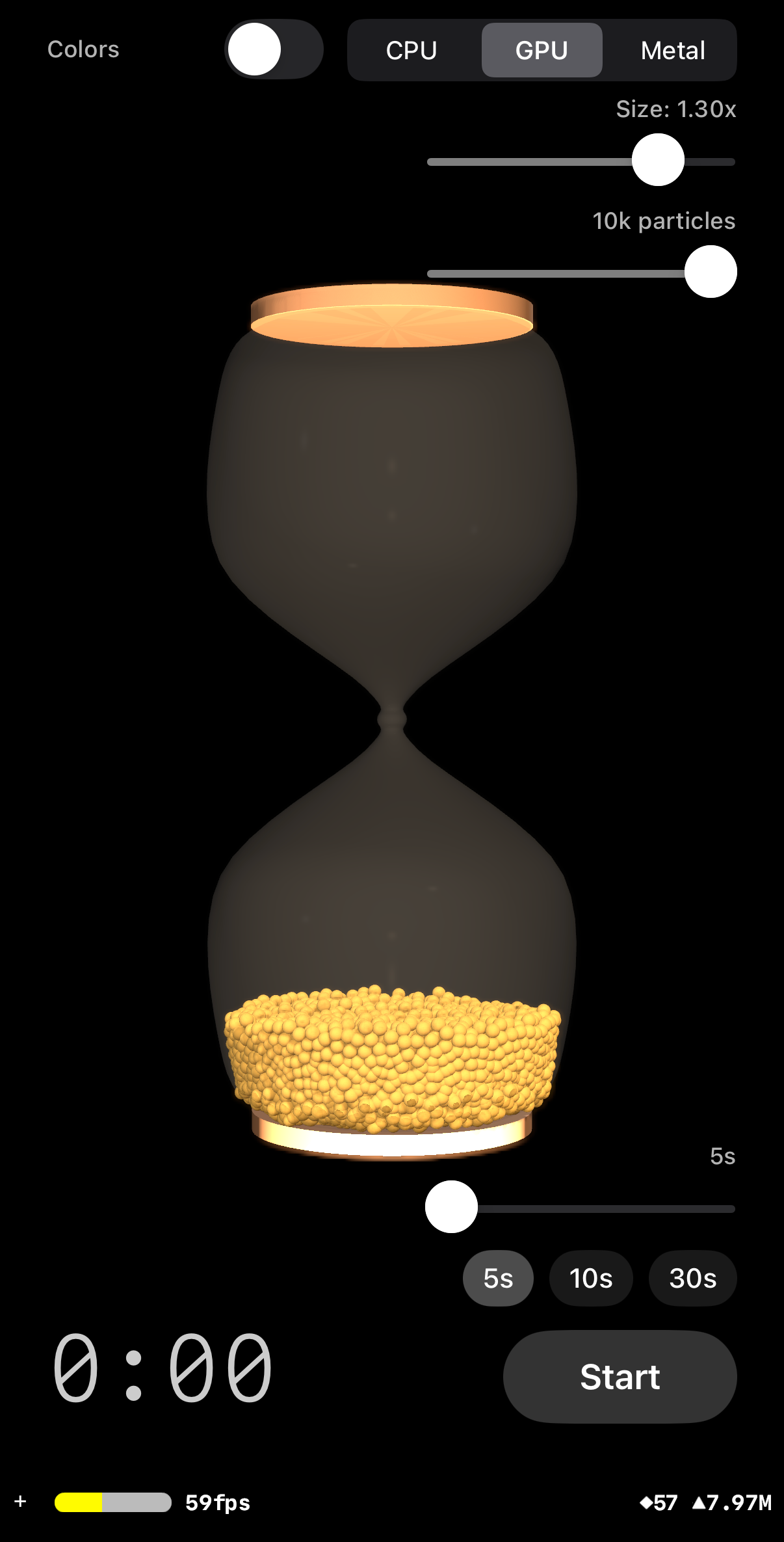
The Initial Vision
Building a procedural 3D hourglass from pure code — no 3D models, no imported assets.
Prompt
Could we try building a photorealistic 3D hourglass egg timer app for iPhone? I’m
thinking SceneKit for the 3D graphics. Ideally the hourglass would have smooth glass
curves, visible sand that flows through the neck, and a digital timer overlay. Duration
presets from 1 to 5 minutes. Let’s see if we can make it look stunning.
Procedural geometry pipeline
The entire hourglass shape is generated mathematically at runtime:
- 11 control points define the classic hourglass silhouette
- Catmull-Rom spline interpolation produces ~80 smooth curve points
- Surface of revolution rotates the 2D profile around the Y axis
(64 angular segments) to create the 3D glass mesh
- Custom
SCNGeometry built from SCNGeometrySource and
SCNGeometryElement — full control over every vertex and triangle
Scene architecture
All hourglass geometry lives under a hourglassContainer node (so the
entire hourglass can be rotated for the flip animation), while camera and lights are
children of scene.rootNode (they stay fixed). A 5-point lighting rig with
deliberately low intensities keeps the scene warm without blowing out highlights.
Key decision: Using UIViewRepresentable wrapping
SCNView instead of SwiftUI’s built-in SceneView.
The built-in view doesn’t expose SCNSceneRendererDelegate, which
is essential for per-frame physics updates at 120fps on ProMotion displays.
Glass Material
Finding the right transparency took several iterations — PBR was not the answer.
PBR vs Blinn
PBR (physically based rendering) was the obvious first choice for realistic glass,
but environment reflections add brightness independent of the transparency setting,
making the glass look like frosted white plastic. No combination of PBR parameters
produced clear, barely-there glass.
The fix: Blinn lighting with very low diffuse alpha (0.10),
specular alpha (0.15), shininess 30, dualLayer transparency, and
writesToDepthBuffer = false. This gives a subtle glass look that lets
the particles inside show clearly.
Dual glass surfaces
- Outer glass: visible, Blinn material as described above
- Inner glass: invisible (
opacity = 0), offset
inward by wallThickness (0.008). Exists solely for its
concavePolyhedron static physics body — the collider that
keeps particles inside the hourglass
Gotcha: Two glass surfaces double the opacity if both are visible.
The inner glass must be fully invisible — it exists only for collision.
Also, writesToDepthBuffer = false is required on the outer glass
material, otherwise it occludes particles rendered behind it.
From Fake Sand to Real Physics
Geometric sand meshes looked artificial. CPU-based granular physics replaced them entirely.
Prompt
Let’s go for it — how about a full particle simulation? Maybe start with a
small number of larger particles, perhaps 100, but with a dial that allows ramping up.
The narrowest point in the glass would need to be wide enough to allow at least one
particle through. Could we use the best techniques available on iPhone 16 Pro?
What was replaced
The initial sand used geometric meshes — a bowl shape, body fill, and pile
cone that animated to simulate flowing sand. It worked visually but felt artificial.
SceneKit’s SCNParticleSystem was ruled out (no inter-particle
collision, no resting state). The entire geometric approach was deleted in favour of
a real physics engine.
CPU granular physics engine
- O(N²) brute-force collision: every particle checks against
every other particle for sphere-sphere overlap. Fast enough for 100–250
particles on A17 Pro
- Wall collision via radial symmetry: compute
r =
            sqrt(x²+z²)
and compare against
innerRadiusAt(y:) — the hourglass’s rotational symmetry
reduces 3D glass collision to a 2D radial problem
- Each particle is an SCNNode: shared
SCNSphere
geometry and golden PBR material, with positions synced per frame in
renderer(updateAtTime:)
- Adaptive substeps: 4 for ≤500 particles, 3 for 501–1000,
2 for >1000 — maintains 120fps at higher counts
Flip animation
The hourglass glass and frame caps are geometrically symmetric about Y=0. The flip
exploits this:
- Rotate
hourglassContainer by π around X (1.2s, easeInEaseOut)
— particles tumble with real physics as gravity rotates with the container
- Snap
eulerAngles back to (0,0,0) — invisible because the
shape is identical after 180°
- Transform all particles:
(x,y,z) → (x,-y,-z),
(vy,vz) → (-vy,-vz)
- Two-phase start:
startFlip() triggers the rotation;
completeFlip() starts the timer after the animation finishes
Threading gotcha: SCNAction completion handlers run on
the SceneKit thread, but completeFlip() updates @Published
properties on a @MainActor class. The fix:
Task { @MainActor in vm.completeFlip() }. Also,
presentation.eulerAngles.x (not .eulerAngles) must be used
to read the current in-flight angle — the model property shows the target, not
the interpolated value.
Dynamic Neck & Flow Control
Auto-sizing the neck, controlling flow rate with friction instead of gravity, and hex-packed spawning.
Prompt
Could we try making the narrowest point just big enough for one particle, so the
others back up? The animation finishes far too quickly. I think we’re better off
having natural gravity but really slowing the particles down through the constriction
— maybe friction on the inner surface? Then they’d speed up again via
gravity once they come out. Would you mind adding a duration slider from 10 seconds to
5 minutes too?
Dynamic neck geometry
- Neck auto-sizes: inner opening =
particleRadius +
            wallThickness + 0.002
— barely fits one ball through
- Steep funnel shoulders: control points at ±0.04 height
with radius
neckRadius × 1.8 create a sharp constriction that
forces single-file flow and natural particle backup/jamming
SandGeometry.setNeckRadius() rebuilds both glass profiles when
particle count changes. The activeInnerProfile ensures
innerRadiusAt(y:) and the GPU profile lookup table both use the
updated shape
Neck friction replaces gravity scaling
An earlier attempt scaled gravity inversely with duration (effectiveGravity =
2.0 / duration), but this made the whole scene feel like slow motion. The
solution: constant gravity (1.0) with a friction zone at the neck.
neckDamping = duration × 0.02 — stronger at longer
durations- Applied where
|y| < 0.10 (neck half-height), ramping linearly
toward the centre
- Velocity *=
max(0, 1 - neckFactor × neckDamping ×
            subDt)
- Particles fall naturally in the chambers and slow down through the constriction
— exactly how a real hourglass behaves
Hex close-packed spawning
Random spawn placement with rejection sampling was replaced by a hexagonal
close-packed lattice filling the lower chamber from bottom up. The shared
GranularSimulation.packedPositions() algorithm is used by all three
physics modes. This produces a near-resting-state configuration — no settling
loops needed, and no UI freezes from O(N²) overlap checking at init.
Two distinct regimes: constant gravity gives satisfying, weighty
free-fall in the chambers. Neck friction gives tuneable constriction at the bottleneck.
Scaling gravity produced a single, uniformly sluggish regime. Friction preserves both
the drama of falling and the patience of trickling.
GPU Physics via Metal Compute
Moving the O(N²) collision engine to the GPU for 10–20× more particles.
Prompt
Could we try adding a GPU-accelerated mode that I can switch to in the UI? It would
be great to move the physics to Metal compute shaders.
Metal compute architecture
One GPU thread per particle. Each thread applies gravity, updates position, resolves
wall/floor/ceiling collisions, loops over all other particles for sphere-sphere
collision, and applies damping. The full O(N²) algorithm, parallelised across
thousands of threads.
- Double-buffered particles: read from buffer A, write to buffer
B, swap per substep. Avoids race conditions when parallel threads read/write
overlapping particle pairs
- Symmetric collision: each thread applies 1/4 position correction
and 1/4 impulse (partner thread independently does the same, totalling 1/2)
- 256-entry profile lookup table:
innerRadiusAt(y:) sampled at 256 Y values, uploaded as an MTLBuffer.
GPU does O(1) interpolated lookup instead of O(80) linear search
storageModeShared MTLBuffers: zero-copy CPU/GPU
access on iOS unified memory. CPU writes initial positions, GPU runs physics, CPU
reads back positions to update SCNNodesGPUParticle struct: float4
positionAndRadius + float4 velocityAndPad = 32 bytes, naturally
aligned for GPU
UI and persistence
- CPU/GPU segmented picker (top-right, enabled when idle)
- Slider range per mode: 50–250 (CPU), 50–10,000 (GPU)
- Each mode stores its particle count in a separate UserDefaults key
(
particleCount_CPU, particleCount_GPU) — switching
modes recalls the last-used count
- Falls back to CPU mode if
MetalPhysicsEngine init fails (e.g.
simulator without Metal)
Same mistake, twice: the initial GPU implementation included 200
settling steps at init via waitUntilCompleted per step — exactly
the same UI freeze that was fixed for CPU mode. The recurring lesson: never do
expensive work synchronously at init. Let particles settle in real-time via the
render loop.
Metal Instanced Mode — Three Approaches
Eliminating the CPU readback bottleneck through three iterations of trial and error.
Prompt
Please could you try adding Metal instanced rendering as a third option? The CPU
readback to update 10,000 SCNNodes seems to be the bottleneck now.
Attempt 1: SCNNodeRendererDelegate (failed)
Custom Metal draw calls via SCNNodeRendererDelegate with
drawIndexedPrimitives(instanceCount:). After extensive implementation
— custom vertex/fragment shaders, lazy render pipeline, UV sphere mesh, Blinn
lighting matching SceneKit’s rig — the particles were completely invisible.
Custom draw calls produce no visible pixels in SceneKit’s modern multi-pass
rendering pipeline. Two files were written and then deleted.
Attempt 2: Point primitives (partially worked)
Wrapped the physics MTLBuffer with SCNGeometrySource(buffer:) using
.point primitive type. Particles appeared, but point primitives lack
surface normals — PBR lighting produced black pixels. Switching to
.constant lighting (self-lit) made them visible as bright dots, but
above 10,000 they collapsed into a flat slab because points render as single pixels
with no depth or volume.
Attempt 3: Mesh expansion compute kernel (succeeded)
- A second Metal compute kernel (
expandMeshes) expands each particle
into an octahedron mesh (6 vertices, 8 triangular faces) with proper normals
SCNGeometrySource(buffer:) wraps the expanded vertex buffer;
pre-computed static index buffer for the octahedron topology- Full PBR material works because octahedron normals provide correct lighting
- SceneKit renders the triangle geometry through its standard pipeline —
depth, shadow, and compositing all work
- Zero CPU readback: Physics Compute → Mesh Expansion
Compute →
SCNGeometrySource(buffer:) → SceneKit renders.
The CPU never touches particle positions
- Geometry created once during setup and reused — SceneKit re-reads the
updated MTLBuffer each frame automatically. Rebuilding geometry per frame caused
visible flicker
Lesson learned: SCNNodeRendererDelegate is effectively
broken for custom Metal draw calls in modern SceneKit. The reliable path to custom GPU
geometry is SCNGeometrySource(buffer:) with .triangles
elements — it feeds into SceneKit’s standard pipeline and gets all
rendering passes for free. Up to 50,000 particles with this approach.
Visual Polish
Consistent volume fill, velocity-dependent damping, particle size control, and always-on collision.
Prompt
The amount of volume filled with 250 CPU particles should look similar at higher
counts — about 25% of the hourglass filled. Also, particles settle too slowly
after reset — could we get them to reach steady state faster? And would it be
worth adding a particle size slider, persisted per mode?
25% volume fill with packing correction
The base formula r ∝ N^(-1/3) keeps total sphere volume constant,
but at higher counts smaller particles leave more wall clearance, so each hex-packed
layer holds proportionally more particles and the pile appears shorter. A correction
factor (effR / refEffR)^(2/3) scales radius up at high counts to maintain
the same visual fill height as the 250-particle reference.
Damping and settling (initial attempts)
Getting particles to settle naturally proved much harder on the GPU than the CPU.
The initial approach used uniform damping and a sleep system:
- Neck friction:
neckDamping = duration × 0.02,
applied where |y| < 0.10 — controls flow rate through the
constriction (all modes, retained in the final solution)
- Velocity-dependent damping: blend between flow damping
(
pow(0.92, subDt)) at high speed and settle damping
(pow(0.05, subDt)) near rest, threshold 0.15. Applied uniformly
everywhere. Reduced jitter but did not eliminate it (all modes)
- Per-particle sleep system (GPU/Metal only):
velocityAndPad.w stores a per-particle sleep counter. When speed
stays below a threshold for consecutive frames, the particle “sleeps”
— reducing physics work. This helped but introduced a new problem: after a
flip, the sleeping pile in the upper chamber refused to drain through the neck.
The uniform sleep threshold and settle damping were killing gravitational acceleration
in the upper chamber
- Velocity cutoff (GPU/Metal only): snap velocity to zero
if speed < 0.01. Combined with settle damping, this zeroed out the tiny gravity
increments that upper-chamber particles needed to start moving
These mechanisms reduced shimmer but caused jamming after flip. The full story of
diagnosing and solving this is covered in Step 9.
Particle size slider and always-on collision
- Size multiplier: 0.5×–1.5× (step 0.05,
default 1.0×) multiplied onto
radiusForCount(). Per-mode
persistence via UserDefaults. Neck auto-adjusts to the final radius
- Always-on O(N²) collision: an earlier
skipCollision optimisation disabled sphere-sphere collision above
10,000 particles. Without collision, particles passed through each other and
collapsed into a flat slab. Removing it entirely and lowering max counts (CPU 250,
GPU 10,000, Metal 50,000) keeps physics correct at all counts
- Golden sand material: PBR diffuse (0.76/0.60/0.28), roughness
0.55, metalness 0.08 — high roughness and low metalness give a natural
matte-sand look
Simplicity wins (partially): the skipCollision hack was premature
optimisation that introduced a visible physics bug. Lowering the max count and always
running collision is simpler code, correct physics, and still achieves 50,000 particles
at interactive frame rates on A17 Pro. However, the GPU settling story was far from over
— uniform damping and sleep thresholds reduced shimmer but caused particles to jam
after flip. The real solution required a fundamentally different approach, covered in
Step 9.
Subdivided Icosahedron & Active Controls
Nearly-spherical Metal particles, always-enabled controls, and final UX refinements.
Prompt
The Metal mode particles look too angular compared to the CPU/GPU spheres —
could we try a better mesh? Also, I’d love it if the mode picker, size, and
count controls were always enabled — maybe changes during animation could
trigger an instant restart for mode, deferred to next start for sliders? And please
could you cap duration at 1 minute.
Subdivided icosahedron mesh
The 6-vertex octahedron was replaced with a 42-vertex subdivided
icosahedron (80 triangular faces). Each vertex lies on the unit sphere, so
vertex normals = vertex positions — producing nearly-spherical shading that
closely matches the SCNSphere used in CPU/GPU modes. The
expandMeshes kernel was updated to generate 42 vertices per particle
(with a static 240-index buffer per particle for the 80 faces).
Always-active controls
- Mode picker: always enabled. Changing mode during animation
triggers an instant restart (teardown current particles, rebuild with new mode)
- Size and count sliders: always enabled. Changes are deferred
— they take effect at the next start or reset, avoiding disruptive mid-animation
rebuilds
- Start/Reset button: always tappable. During flip, tapping resets
immediately (no stuck “Flipping...” state)
- Duration: capped at 1 minute with quick presets (10s / 30s / 1m)
for a focused egg-timer experience
UX principle: disabled controls frustrate users who assume the app is
stuck. Making everything always tappable — with instant restart for mode and
deferred application for sliders — gives immediate responsiveness without
mid-animation visual glitches. The subdivided icosahedron closes the visual gap
between modes: CPU/GPU use SCNSphere, Metal uses a 42-vertex
approximation that looks identical at the particle sizes involved.
The GPU Settling Problem
Why GPU/Metal particles never settled, dozens of failed fixes, a diagnostic breakthrough, and the chamber-asymmetric solution.
The problem
I’m seeing an issue where GPU/Metal particles never fully settle. After reset,
the pile in the lower chamber shimmers and flickers indefinitely — particles
oscillating at speed ~0.05, never reaching rest. Worse, after a flip, the pile in the
upper chamber refuses to drain through the neck — particles jammed in place and
nothing flows. CPU mode works perfectly. The same physics constants, the same collision
algorithm, but fundamentally different behaviour. Any ideas?
Root cause: parallel collision reads stale snapshots
The GPU’s double-buffered collision is the source of both problems:
- Shimmer: all threads read from buffer A and write to buffer B.
Two overlapping particles both apply position corrections independently based on the
same stale snapshot. On the next substep they over-correct, then under-correct, then
over-correct — oscillating indefinitely. CPU mode resolves collisions
sequentially, so each pair sees updated positions and the normal force chain
(floor → bottom layer → top layer) converges naturally
- Jamming: velocity impulses from collision are designed to stop
particles moving toward each other. In a packed pile under gravity, every particle
has gravity pulling it down and collision impulses pushing it up. On the CPU, the
sequential chain propagates the floor’s support upward correctly. On the GPU,
impulses calculated from stale snapshots over-compensate — they cancel out
gravity entirely, leaving particles frozen in mid-air with zero net force. The pile
never drains
Failed approaches (dozens of iterations)
- Pile resting damping: tracked whether each particle had a
neighbor pushing up from below (lower contact support) and applied extra Y velocity
damping. Caused unnatural central columns — particles in the
centre froze while outer particles kept settling. Abandoned
- Position-dependent sleep thresholds alone: generous threshold
(speed < 0.08) in the lower chamber, strict (speed < 0.02) in upper. Caught
the shimmer but particles still jammed after flip because the velocity impulses were
still cancelling gravity before the sleep system could engage
- Reduced correction factors (0.10, 0.05): shrinking the position
correction and impulse factors. Insufficient — shimmer reduced but not
eliminated, and when combined with velocity cutoff and settle damping, the reduction
killed all motion including desired flow
- Velocity cutoff + settle damping (uniform): applying aggressive
settle damping (
pow(0.05, subDt)) and velocity cutoff (snap to zero
below 0.01) everywhere. Settled the lower chamber but killed upper-chamber drainage
— particles that should have been falling through the neck were having their
tiny gravity-accumulated velocities zeroed out every frame
Each approach fixed one symptom while breaking something else. The fundamental tension:
the lower chamber needs aggressive settling to fight parallel-collision shimmer, but the
upper chamber needs gentle physics to let gravity dominate and drain the pile. No single
set of parameters could serve both.
Critical breakthrough: the -test launch argument
After dozens of iterations tweaking parameters by eye and squinting at screenshots,
the key breakthrough was adding diagnostic infrastructure. A
-test launch argument in the Xcode scheme triggers:
- Auto-start with 10-second duration after a 2-second settling delay
- On timer completion, dump every particle’s position, velocity, and sleep
counter to
test_results.txt in the app’s documents directory
- Summary statistics: upper/lower chamber counts, percentage drained, average
speed, sleeping/deep-sleeping counts
The first test dump immediately revealed the problem. Every single
upper-chamber particle had exactly zero velocity. The combination of collision
impulse + settle damping + velocity cutoff was killing every bit of gravitational
acceleration before particles could move. The pile was not “jammed by
friction” — it was frozen by the settling system that was supposed to help.
What looked like a physics problem was actually a damping problem, and no amount of
screenshot-squinting could have revealed the mechanism.
Final solution: chamber-asymmetric physics
The insight from the test data led directly to the solution: treat the two
chambers as fundamentally different physics regimes. The Metal shader branches
on pos.y:
- Lower chamber (pos.y < 0) — settle mode:
- Full collision: position correction (0.25) + velocity impulse (0.25)
- Aggressive settle damping: blend between flow (
pow(0.92, subDt))
and settle (pow(0.05, subDt)) based on speed
- Velocity cutoff: snap to zero below 0.01
- Sleep system: counter increments when speed < 0.08; light sleep at 16,
deep sleep at 30 (zero GPU work). Generous threshold catches the ~0.05
parallel-collision oscillation
- Result: stable resting piles, no shimmer, no flicker
- Upper chamber (pos.y > 0) — flow mode:
- Position correction only (0.25) — no velocity impulse.
This is the critical difference. Without impulse, gravity is the dominant force
and particles drain freely through the neck
- Flow damping only:
pow(0.92, subDt) uniformly — no
settle damping blend
- No velocity cutoff — tiny gravity increments must accumulate
- No sleep — sleep counter forced to 0. Particles must stay fully awake
to drain
- Result: gravity dominates, pile drains freely, natural flow
Validation
The -test infrastructure proved its value immediately. After implementing
chamber-asymmetric physics:
- 5,000 particles, 10s timer → 100% drained, all particles in
lower chamber, all settled (deep sleep), average speed 0.000000
- No shimmer, no flicker, no jammed piles
- Upper-chamber particles fall naturally under gravity, slow through the neck
friction zone, and settle aggressively once they cross y=0 into the lower chamber
snapAfterFlip resets all sleep counters to 0, ensuring every particle
starts fully awake after a flip regardless of prior state
Lesson: data-driven debugging beats screenshot-squinting. Dozens of
iterations adjusting physics parameters by visual inspection failed to find the root
cause. One test dump — a simple text file with per-particle velocities —
immediately revealed that the settling system itself was the problem, not the collision
physics. The -test launch argument took 20 minutes to add and saved hours
of guesswork. The final solution (chamber-asymmetric physics) is conceptually simple:
the lower chamber needs to fight parallel-collision artefacts with aggressive damping,
while the upper chamber needs gravity to win, so skip the impulse entirely. CPU mode
doesn’t need any of this because sequential resolution converges naturally.
Data-Driven Debugging
Adding a -test launch argument that dumps particle state to disk — the single most impactful debugging tool in the project.
Prompt
Could we try adding a -test launch argument that auto-starts a
10-second timer and dumps every particle’s position and velocity to a text file
when the timer completes? It would be really helpful to see exactly what the physics
engine is doing, rather than just squinting at the screen.
Implementation
-test launch argument: detected via
CommandLine.arguments.contains("-test"). Triggers auto-start with a
10-second duration after a 2-second settling delay- Particle dump: on timer completion, writes every particle’s
position, velocity, and sleep counter to
Documents/test_results.txt
- Summary statistics: upper/lower chamber counts, percentage drained,
average speed, sleeping/deep-sleeping particle counts
Immediate payoff
The first test dump revealed the root cause of the GPU settling problem instantly.
Every single upper-chamber particle had exactly zero velocity. The
combination of collision impulse + settle damping + velocity cutoff was killing all
gravitational acceleration before particles could move. What had looked like a physics
or friction problem was actually a damping problem — and no amount of visual
inspection could have revealed the mechanism. One text file with per-particle velocities
made the invisible visible.
Turning point: this was the diagnostic breakthrough that ended dozens of
failed iterations tweaking physics parameters by eye. The -test infrastructure
took 20 minutes to add and immediately pointed to the solution. It transformed GPU physics
debugging from guesswork into engineering.
Chamber-Asymmetric Physics
The breakthrough fix — treating upper and lower chambers as fundamentally different physics regimes.
Prompt
The test dump shows all upper-chamber velocities are zero — it looks like the
settle damping and velocity cutoff are killing gravity before particles can move. Could
we try different physics rules for each chamber? Maybe aggressive settling below y=0
but gentle flow above y=0?
The fundamental insight
Parallel GPU collision (double-buffered, each thread reads stale snapshots) creates
two distinct problems that require opposite solutions:
- Lower chamber: particles oscillate at ~0.05 speed because
parallel collision corrections over/under-shoot on alternating frames. Needs aggressive
damping, velocity cutoff, and sleep to suppress the shimmer
- Upper chamber: particles must accumulate tiny gravity increments
frame over frame to start draining. The same aggressive damping that fixes shimmer below
zeroes out these increments above, freezing the pile. Needs gentle physics where gravity
dominates
No single set of parameters could serve both regimes. The Metal shader now branches on
pos.y:
Two-regime physics
- Lower chamber (pos.y < 0) — settle mode: full collision
with position correction (0.25) + velocity impulse (0.25), aggressive settle damping
(
pow(0.05, subDt) blend), velocity cutoff (snap to zero below 0.01), and
sleep system (light sleep at 16 frames, deep sleep at 30)
- Upper chamber (pos.y > 0) — flow mode: position correction
only (0.25) with no velocity impulse, flow damping only
(
pow(0.92, subDt)), no velocity cutoff, no sleep. Sleep counter forced
to 0 so particles stay fully awake to drain
Why no impulse in the upper chamber works
Velocity impulse exists to stop overlapping particles from moving toward each other.
In a packed pile under gravity, every particle gets gravity pulling down and impulse pushing
up. On the GPU, impulses from stale snapshots over-compensate — they cancel gravity
entirely. Removing impulse in the upper chamber means gravity is the only net force.
Position correction alone prevents particles from overlapping, but doesn’t fight
their downward motion. The pile drains freely.
Validation
Re-running the -test dump after the fix: 5,000 particles, 10-second
timer → 100% drained, all particles in lower chamber, all deep sleeping,
average speed 0.000000. No shimmer, no flicker, no jammed piles.
snapAfterFlip resets all sleep counters to 0, ensuring every particle starts
fully awake regardless of prior state.
Key lesson: CPU mode never needed any of this because sequential collision
resolution naturally propagates floor support upward through the pile. The GPU’s
parallel architecture requires explicit acknowledgement that settling (fight shimmer) and
flowing (let gravity win) are fundamentally different goals requiring different physics
rules. Chamber-asymmetric physics is the simplest correct solution.
UI Polish & Persistence
Duration persistence, control layout refinements, and removing the SceneKit startup fade.
Prompt
Could we persist the duration in UserDefaults (default 10 seconds)? Also, would you
mind moving the controls up a bit to reduce overlap with the bottom edge? And if
possible, let’s try getting rid of the SceneKit fade-in — ideally the
scene would appear instantly.
Changes
- Duration persistence: saved to and restored from UserDefaults
with a default of 10 seconds, matching the most common egg-timer use case. Joins
physics mode and per-mode particle count as persisted settings
- Control layout: bottom controls shifted upward to prevent overlap
with the screen edge and home indicator area, improving thumb reachability
- SceneKit startup fade removed: the default SceneKit
fade-in animation was disabled so the hourglass appears instantly when the app
launches, rather than fading in from black over ~0.3 seconds
Small details matter: the startup fade was barely noticeable but made the
app feel sluggish. Duration persistence means users don’t have to re-adjust the
slider every launch — the app remembers their preferred timer length alongside
their preferred physics mode and particle count.
Random Per-Particle Colors
A toggle that gives each particle a unique random HSB color — implemented differently for each rendering mode.
Prompt
How about adding a toggle for random per-particle colors? Each ball could get a
random color from the full HSB spectrum. Would it be possible to make it work across
all three physics modes?
CPU and GPU modes: per-node materials
In CPU and GPU modes, each particle is an SCNNode with a shared
SCNSphere geometry. To give each particle a unique color, the shared geometry
is replaced with per-node copies of SCNSphere, each assigned
a unique PBR material with a random HSB diffuse color. This uses more memory than the
shared-geometry approach but is straightforward — SceneKit handles per-material
rendering natively.
Metal mode: per-vertex colors via expanded mesh
Metal mode has no SCNNode per particle — all particles are a single
mesh generated by the expandMeshes compute kernel. Adding per-particle
colors required changes at every level:
MeshVertex struct expanded to 28 bytes: the previous
layout stored position (12 bytes) + normal (12 bytes) = 24 bytes. A
packed_float3 color field was added, bringing the total to
packed_float3 position + packed_float3 normal + packed_float3 color
(36 bytes, or 28 with tighter packing depending on alignment)- Color buffer: a separate MTLBuffer stores one random
packed_float3 RGB color per particle. The expandMeshes
kernel reads from this buffer and copies the particle’s color to every vertex
of its mesh
SCNGeometrySource with .color semantic:
a third geometry source wraps the color data from the expanded mesh buffer, telling
SceneKit to use per-vertex colors for rendering
Three modes, three approaches: CPU/GPU use SceneKit’s material
system (per-node SCNSphere copies with unique materials). Metal bypasses
SceneKit’s material system entirely by baking color into the vertex data via a
compute kernel and a .color geometry source. The toggle applies instantly
on the next particle setup — no restart required.
Test Target
Adding ShiftingSandsTests with CPU and GPU physics test suites — 12 tests covering the core simulation.
Prompt
Let’s get data access and tests in early! Could we add a test target with tests
for both the CPU and GPU physics engines? It would be great to cover the fundamentals:
gravity, floor containment, sphere collision, flip transform, full drain, settling,
and wall containment.
CPUPhysicsTests (7 tests)
- Gravity: a free particle falls downward over time
- Floor containment: a particle at the bottom stays above the floor
- Sphere collision: two overlapping particles are pushed apart
- Flip transform:
(x,y,z) → (x,-y,-z) and velocity
inversion are correct
- Full drain: after enough simulation steps, all particles end up
in the lower chamber
- Settling: particles reach near-zero velocity after sufficient
time
- Wall containment: particles stay inside the glass profile
GPUPhysicsTests (5 tests)
- Gravity: GPU particle falls under gravity matching CPU behaviour
- Floor containment: GPU particles stay above the chamber floor
- Sphere collision: overlapping GPU particles separate
- Flip transform:
snapAfterFlip Metal kernel correctness
- Wall containment: particles remain within the glass profile after
simulation
Test infrastructure
- Uses the Swift Testing framework (
import Testing,
@Test, #expect())
- GPU tests require a real Metal device — they check for
MTLCreateSystemDefaultDevice() and skip gracefully on simulators
without Metal support
- Tests exercise the same
GranularSimulation and
MetalPhysicsEngine code paths used by the app — no mocks or
simplified physics
- All 12 tests pass on device
User wisdom: “provide data access and tests early!” The test
target validates the physics engines in isolation, catching regressions that would be
invisible during visual testing. Combined with the -test launch argument
from Step 10, the project now has two layers of verification: automated unit tests for
correctness, and the diagnostic dump for real-device behaviour analysis. Both were added
late in the project — the lesson is to add them from the start.
Lighting & UI Polish
Refined particle lighting, moved controls for better layout, and fixed button behavior after timer completion.
Prompt
The underside of particles is blown out white in GPU and Metal mode — could we
try a different lighting approach? Also, would you mind moving the colour selector to
top-left? The hourglass should ideally show immediately. The Start/Reset button after
timer completes needs a look too. And could we improve GPU color mode performance?
Lambert lighting model
- Switched all particle materials from
.physicallyBased to
.lambert — eliminates specular highlights and Fresnel reflections
that caused white blowout on particle undersides
- Key light intensity reduced from 200 to 120, bottom fill from 25 to 8
- Metal mode mesh material uses
UIColor(white: 0.78) diffuse (slightly
below white) to match perceived brightness of CPU/GPU SCNSphere nodes
GPU color performance
- Random color mode was creating per-node
SCNSphere copies (N draw
calls!) — replaced with a 24-color palette of shared geometries
- Nodes randomly assigned to palette entries, allowing SceneKit to batch ~N/24
nodes per draw call
- Dramatic performance improvement in GPU mode with colors enabled
UI and button fixes
- Color toggle moved from top-right to top-left corner
- All top controls pushed up to
.padding(.top, 8) (was 60) to minimize
hourglass overlap
- Added
scnView.prepare(scene, shouldAbortBlock:) for synchronous
shader compilation — eliminates fade-in
- Button now shows “Start” after timer completes (was “Reset”)
— pressing it resets and starts a new flip
- Added
-multicolor launch argument
Key insight: PBR lighting models have unavoidable Fresnel reflections at
grazing angles — the physics is correct (all surfaces reflect 100% at extreme angles)
but visually wrong for matte sand particles. Lambert’s pure diffuse shading is
physically simpler but visually more appropriate. Sometimes the less sophisticated model
produces the better result.
Physics Debugging & Spawn Fixes
Data-driven debugging round 2 — CLI diagnostic args reveal mid-air freezing, missing respawn, and neck-region overflow placement.
The problems
I’m seeing a couple of issues in GPU mode after the timer runs: (1) particles
seem to be getting stuck mid-air with no physical support beneath them, and (2) reset
sometimes fills the entire chamber with particles jammed in the middle. Both are
intermittent and hard to reproduce visually — could we investigate?
Diagnostic approach: CLI launch arguments
Extended the existing -test infrastructure with new CLI diagnostic arguments
to reproduce and diagnose without guesswork:
-mode [CPU|GPU|Metal] — force a specific physics mode-count N — force a specific particle count-size N — force a specific size multiplier-dumpspawn — dump spawn position histogram on startup, showing
particle distribution by Y-height region (upper chamber, neck, lower chamber)
Running in the simulator with -mode GPU -count 10000 -size 1.3 -dumpspawn
immediately produced actionable data.
Root cause 1: velocity cutoff freezes unsupported particles
The GPU sleep system (from Step 9) used a velocity cutoff: particles below a speed
threshold had their velocity snapped to zero and their sleep counter incremented. The
problem was that the cutoff only checked velocity, not whether the particle
had any physical support beneath it. A particle could be in mid-air, momentarily slow
(e.g. after a collision impulse cancelled its downward velocity), get frozen by the cutoff,
and stay stuck with zero velocity forever — gravity increments zeroed out every frame
by the same cutoff.
The fix: added a contactCount tracker in the collision loop.
Only particles that are actively touching at least one other particle (or the floor) can
enter the sleep/freeze state. Unsupported mid-air particles always stay fully awake,
allowing gravity to pull them down.
Root cause 2: missing respawn after timer completion
After the timer ran to natural completion, particles were not respawned.
The next tap of “Start” would flip whatever was left from the previous run
— often a disorganised mess with particles scattered throughout both chambers. If
particles had drifted or settled unevenly, the flip would start from a bad initial state.
The fix: respawn particles on manual Reset only. Natural timer completion
leaves particles at rest where they settled — no visual jump. Flip start only rebuilds
if count/size/color settings changed. This gives clean transitions between runs without
jarring respawn flashes.
Root cause 3: overflow particles placed near the neck
The hex-packed spawning algorithm (packedPositions()) has a capacity limit
per layer. When more particles are requested than fit in the lower chamber’s hex grid,
overflow particles need to go somewhere. The original code placed them near y = 0
— the neck region. These particles would immediately jam in the constriction on the
next flip, blocking flow.
The -dumpspawn histogram made this obvious: with 10,000 particles at size
1.3×, the dump showed a cluster of particles near y = 0. After the fix
— placing overflow particles in the lower chamber bulge (the widest part, well below
the neck) — the dump showed 0 upper-chamber particles, 0 near-neck
particles.
Other changes in this session
- Duration range: changed from 10–60s to 5–30s, default 5s
— tighter range for a focused egg-timer experience
- Gravity scaling: gravity now scales inversely with duration (full
strength at 5s, approximately 0.17 at 30s) to keep flow rate proportional across the
range
- Spawn packing unit tests: 14 tests total (was 12), adding coverage
for the overflow placement fix and spawn distribution
Data-driven debugging, again. This was the second time diagnostic data
immediately revealed what visual inspection could not. The spawn dump histogram showed
particles near y = 0 (the neck) within seconds of running the command —
confirming the overflow placement bug. The contactCount fix for mid-air
freezing was equally invisible to the eye: a particle hovering motionless looks identical
to a properly resting particle unless you know its support state. The CLI diagnostic
arguments (-mode, -count, -size,
-dumpspawn) are lightweight to add and transform reproduction from
“sometimes happens if you try enough times” into “deterministic on
first run.”
Sleep System Deep Dive
Three interconnected sleep bugs discovered and fixed in sequence — mid-air suspension, FPS collapse, and glass blur.
The problem
I’m noticing a few things in GPU mode with 10,000 particles at size 1.3: some
particles seem to be left hanging just above the settled pile. Also, FPS is dropping
from 60 to ~14 near the end of the animation, and particles appear blurry through the
front of the glass during settling. Could we take a look?
Bug 1: sleeping particles whose support moved away
When a particle entered deep sleep (counter >30), it stayed frozen forever —
even if the particles supporting it had since moved away. A particle sitting on top of
another could remain suspended in mid-air after the lower particle drained through the neck.
The deep sleep early-return wrote the same position every frame without checking whether
support still existed.
The fix: support verification in deep sleep. Before staying asleep,
check if the particle still has support: floor contact counts as support (cheap Y check),
otherwise scan nearby particles within 1.05× touching distance. If no support found,
reset the sleep counter to 0 and let the particle fall. Added a unit test:
sleepingParticleWakesWhenSupportRemoved.
Bug 2: FPS collapse from O(N) support scans
The support verification scan ran for every deep-sleeping particle every
frame. At 10,000 particles with most in deep sleep, this added ~80 million
distance checks per frame. The GPU couldn’t sustain 60fps.
The fix: staggered support checks. Each particle only verifies support
every 30 frames, offset by its thread ID (sleepCounter % 30 == tid % 30).
Only ~N/30 particles check per frame, reducing overhead by 30×. A particle whose
support disappears wakes within ~0.5 seconds (30 frames at 60fps) — fast enough to
be visually imperceptible.
Bug 3: glass blur from light sleep oscillation
Light sleep (counter 16–30) tracked sleepContactCount and woke
particles when they lost contacts. The problem: particles barely separated from neighbors
(distance slightly exceeding the touching threshold) had zero contacts, woke every ~15
frames, made a micro-movement, and re-entered sleep. This oscillation at ~4Hz created
visible blur through the transparent glass. SceneKit’s temporal jittering (AA)
amplified the effect by blending successive frames.
The fix: removed sleepContactCount from light sleep entirely.
Light sleep now wakes only if a non-sleeping neighbor is approaching fast
(relVelNormal < -0.05). Support-loss detection is deferred to the deep
sleep staggered check, which runs less frequently and doesn’t cause oscillation.
Also disabled isJitteringEnabled — MSAA 4X provides sufficient AA
without temporal artifacts.
Cascading fixes: the three bugs were deeply interconnected. Fixing mid-air
suspension (support verification) introduced the FPS collapse (too many scans). Fixing the
FPS collapse (staggering) was cheap enough but the blur remained until the light sleep
oscillation was identified as a separate issue. Each fix was necessary but not sufficient
— all three together produced stable, efficient, blur-free settling.
Visual Tuning & Spawn Control
Camera depth of field, spawn height limits, and a flatness test for the initial particle pile.
Prompt
Particles are bouncing around at the bottom and it looks like motion blur —
could we try f/11 for deeper focus? Also, the start and reset operation still starts
with some particles very near the neck of the hourglass — ideally at max they’d
be no more than half way up the bottom half. And if possible, the top layer should be
flat rather than blocky.
Camera tuning
- f-stop 5.6 → 11.0: deeper depth of field keeps more particles
in sharp focus, reducing perceived blur at the edges of the pile
motionBlurIntensity = 0: explicitly disabled to prevent
any per-frame motion blur from compounding with the settling micro-movements- Jittering disabled:
isJitteringEnabled = false eliminates
SceneKit’s temporal anti-aliasing, which was smearing micro-movements through the
transparent glass. MSAA 4X provides clean anti-aliasing without temporal artifacts
Spawn height control
The hex-packed spawning had three iterations:
- Original (
maxY = -0.05): particles spawned too close
to the neck, getting stuck on reset
- First fix (
maxY = -0.24): too restrictive — at
high particle counts, the hex lattice couldn’t fit all particles below -0.24.
Overflow particles were placed randomly, creating an uneven “weird block” in
the middle
- Final fix (
maxY = -0.10): the hex lattice fills from
the bottom and stops early when it has enough particles. At low counts it naturally
stays well below -0.24. At high counts with large sizes, it extends up to -0.10 (still
well below the neck at y=0). Overflow random placement rarely triggers
Top layer flatness test
Added spawnTopLayerIsFlat() to the CPU test suite. The test spawns particles
at four configurations (5k/10k at 1.0/1.3 size), sorts by Y, and verifies the spread of
the top 5% of particles is within 3 particle diameters. This catches the blocky spawn
pattern that occurred with the too-restrictive -0.24 cap. 16 tests total (10 CPU, 6 GPU).
Iterative refinement: the spawn height went through three values before
settling on the right balance. The key insight was that the hex lattice naturally stops
early at low counts — a generous upper limit (-0.10) doesn’t cause problems
because the lattice fills bottom-up and exits as soon as it has enough particles. Only at
very high counts with large sizes does it extend above -0.24, and -0.10 keeps it well
clear of the neck. The flatness test ensures future changes don’t regress the spawn
quality.
App Icon
Programmatic icon generation using the exact hourglass profile from the simulation code.
Prompt
One thing we don’t have is a nice dark-mode app icon. I think one modelled on
the main logo in sscrop.png would be nice — or a stylistic version of that at least.
Icon generation approach
- Python/Pillow script (
generate_icons.py): generates all three
icon variants (standard, dark, tinted) at 1024×1024 RGB
- Exact hourglass profile: reuses the same 11 Catmull-Rom control points from
SandGeometry.swift, interpolated to a smooth 2D silhouette
- 3× supersampling: draws at 3072×3072 then downscales with
LANCZOS for clean anti-aliased edges
- Deep charcoal background (#1A1A2E): matches the app’s dark aesthetic
Design elements
- Glass silhouette: subtle dark fill with bright blue-silver edge outlines
and a specular highlight curve on the right side
- Hex-packed sand balls: individually visible golden spheres with highlight
and shadow dots, settled in a shallow layer at the bottom of the lower chamber —
matching the app’s resting state
- Wooden caps: warm tan rounded rectangles at top and bottom with highlight
and shadow stripes
- Radial glow: soft ambient glow behind the hourglass for depth
Three variants
- Standard: warm dark purple-grey background for light-mode home screens
- Dark: deep charcoal (#1A1A2E) background for dark-mode home screens
- Tinted: greyscale on near-black for iOS tinted mode
Referenced in Contents.json with luminosity appearance variants,
matching the pattern used across all projects.
Iterative refinement: the first version packed sand into both chambers with
scattered particle texture — too busy. The second tried hex-packed balls filling the
entire lower chamber — still too many. The final version places a shallow layer of
larger, individually visible golden balls at the very bottom, faithfully matching the
screenshot. The key was treating the icon as a miniature of the app’s resting state
rather than trying to show the hourglass mid-flow.